
Intro
System properties refer to settings that define the overall behavior and configuration of the platform itself. These properties often control system-wide functionalities.
System properties establish the foundation for how the platform operates and how users interact with it. They ensure a consistent and optimized user experience for all users working within the platform.
Administrators use system properties to configure the platform to meet the specific needs of their organization.
They can be grouped by these categories:
-
General settings: Language preferences, launches mode, system’s usability
-
Security: User authentication methods, access control levels
-
Performance: Settings related to caching, proxy, CORDS and other optimizations.
-
Integration: Configuration options for connecting to external data sources or services.
How to configure
Only System_admin group can access to this tab
You can set system properties going on Control Panel > System > System properties.
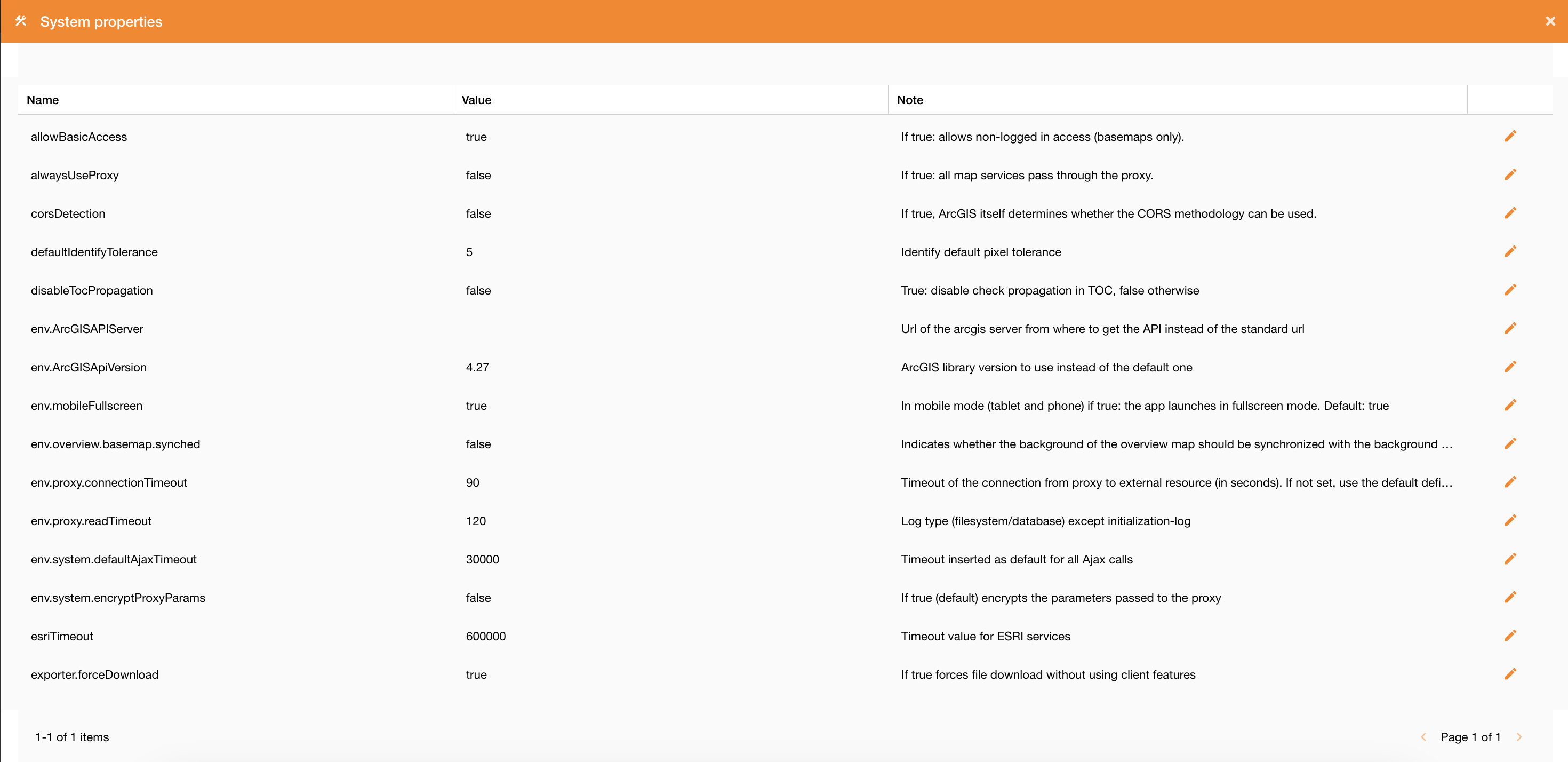
Clicking the System Properties tab, you can set them.
|
|
|---|
|
Figure 2 - System Properties view |
Clicking on the edit icon you can change their values.
Description of system properties
System properties are described in the following table.
|
Field |
Description |
|
toast.timeouttoast.timeout |
The amount of time in milliseconds to wait before destroying the toast notification automatically |
|
SSODefaultGroup |
Name of the group to which to associate users, in case of self-registration with Auth0. Default: Viewer |
|
taskDeadTime |
Time expressed in minutes after which a task must be considered interrupted due to external causes |
|
SSODefaultZone |
Name of the zone to which to associate users, in case of self-registration with Auth0. Default: null |
|
maxDefaultActiveLayers |
Maximum number of sublayers for autoactivation. If a service contains more layers than those specified here, all sublayers start deactivated. Otherwise they're leave active. |
|
corsDetection |
If true, ArcGIS itself determines whether the CORS methodology can be used. |
|
proxyAuthCacheValidity |
Proxy authentication cache lifetime (in seconds). |
|
locale |
Default localization of GUI (en) |
|
taskTimeType |
Time type for storing task data: Possible values: server (uses the server time), utc (is stored in utc) |
|
exporter.url |
URL for the grid data export service |
|
exporter.forceDownload |
If true forces file download without using client features |
|
SSOAutoCreateUser |
If true: it allows the self-census by inserting the users logged in with auth0 into the database. |
|
env.mobileFullscreen |
In mobile mode (tablet and phone) if true: the app launches in fullscreen mode. Default: true |
|
env.ArcGISApiVersion |
ArcGIS library version to use instead of the default one |
|
env.proxy.connectionTimeout |
Timeout of the connection from proxy to external resource (in seconds). If not set, use the default defined by Java. |
|
env.proxy.readTimeout |
Log type (filesystem/database) except initialization-log |
|
env.ArcGISAPIServer |
Url of the arcgis server from where to get the API instead of the standard url |
|
env.overview.basemap.synched |
Indicates whether the background of the overview map should be synchronized with the background of the main map |
|
env.system.encryptProxyParams |
If true (default) encrypts the parameters passed to the proxy |
|
env.system.defaultAjaxTimeout |
Timeout inserted as default for all Ajax calls |
|
allowBasicAccess |
If true: allows non-logged in access (basemaps only). |
|
alwaysUseProxy |
If true: all map services pass through the proxy. |
|
log.persistenceLevel |
Persistence log channel. Possible values: off, info, query, all. |
|
log.applicationLevel |
Tracing log channel. Possible values: off, warn, info debug, trace, all. |
|
urlCompanyWebsite |
Company website URL |
|
defaultIdentifyTolerance |
Identify default pixel tolerance |
|
hiddenLogout |
True to set the logout button visible, false otherwise |
|
maxFeaturesOGC |
Default value maximum number of results on getFeatureInfo OGC |
|
terrainGround |
Type of 3D ground elevation |
|
pwdRule |
Password validation rule type |
|
disableTocPropagation |
True: disable check propagation in TOC, false otherwise |
|
esriTimeout |
Timeout value for ESRI services |
|
terrainModel |
Type of terrain visualization 2D or 3D |
|
log.delayRestore |
delay in restoring the log level (in minutes) |
|
geometryServiceUrl |
The default geometryService used by widgets and other operations, such as on-the-fly projections. |
|
fsm.stateCodeToKeep |
List of work order states id (fsm) to keep after daily cleanup (provide list separated by comma). https://overit-spa.atlassian.net/wiki/spaces/NEXTGENGEO/pages/104570322988/Work+orders+management+-+Module+configuration?atlOrigin=eyJpIjoiMmY2OTQwNjk3YzE0NGU3YmI1NGZlZjU4ZWRmNTFiNTIiLCJwIjoiYyJ9 |
|
fsm.maxWorkorderTTL |
Maximum range (in days) that defines the length of the sliding window for work orders import. https://overit-spa.atlassian.net/wiki/spaces/NEXTGENGEO/pages/104570322988/Work+orders+management+-+Module+configuration?atlOrigin=eyJpIjoiMmY2OTQwNjk3YzE0NGU3YmI1NGZlZjU4ZWRmNTFiNTIiLCJwIjoiYyJ9 |