
The scheduling process in the FSM Platform is totally based on the integration with the Gisware (VRP) Module.
|
|
|---|
|
Figure - Next-Gen FSM Platform and VRP Integration |
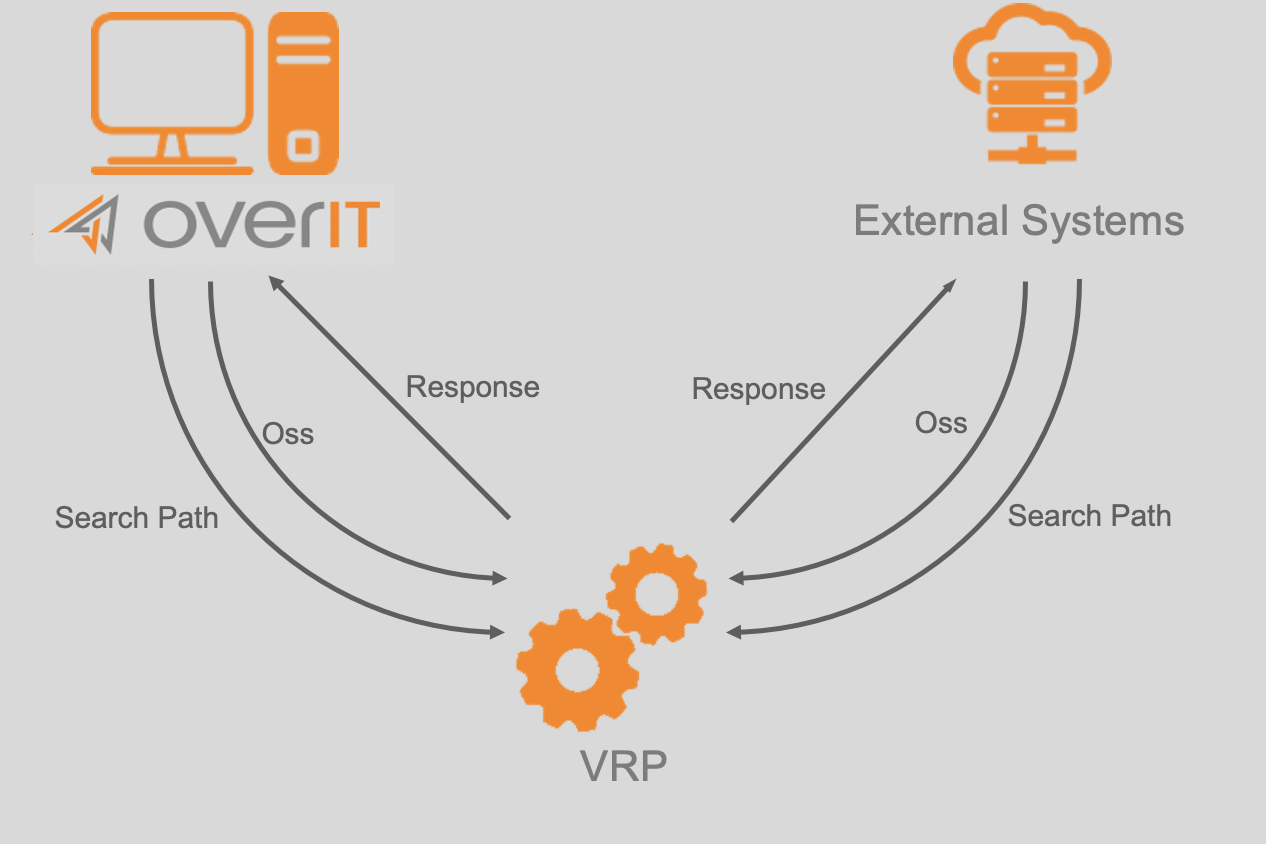
The scheduling flow, associated with a single Scheduling Model, consists of the following steps:
-
Scheduling model selection;
-
Daemon selection;
-
Scheduling type selection
-
Real Time/Daily rielaboration
-
Single Resource - Day Optimization
-
Single Resource - Enriched Optimization
-
Virtual elaboration
-
VRP6_fase1
-
VRP6_fase2
-
Team/Formation integration mode:
-
resource
-
team
-
-
New fase 1.5
-
-
-
Extraction activity
-
Booking
-
Locked
-
Saturation
-
-
Listed filters application;
-
Application of non-scheduling rules;
-
Priority application;
-
Loading the algorithmic processing step;
-
Call to the service VRP OSS;
-
Monitoring / Logging activities and possible reasons for the exclusion.
Model selection
The scheduling model is explicitly indicated when launching the scheduling, both manual and automatic.
In the various configuration masks of the scheduling calendar, in fact, the processing of a specific model is planned (or started manually).
Scheduling Type selection (LSCHEDULINGSTAGE)
Depending on the scheduling scope, the corresponding VRP scheduling type is selected by the system. The scheduling type guides some of the choices and the subsequent phases of the process flow carried out by the system during the processing.
For each type of the scheduling, it is necessary to associate a configuration of the resolution parameters and the different processing phases of the scheduling process performed by the Gisware.
|
Code (LSCSNAME) |
Description |
Environment |
Next-Gen FSM Platform functionality |
VRP service |
|---|---|---|---|---|
|
VRP_R_R |
VRP Real daily rielaboration |
Real Plan |
Rielaboration Real-Time |
OSS Service |
|
TSP_O_G |
TSP Day Optimization |
Manual Scheduling of the Real Plan or Virtual Plan |
Route optimization |
OSS Service |
|
TSP_O_A |
TSP Enriched Optimization |
Manual Scheduling of the Real Plan or Virtual Plan |
Optimize and integrate |
OSS Service |
|
VRP6_FASE_1 |
Processing Model Construction Teams |
Virtual Plan; The first mandatory step of the automatic processing |
Automatic processing - automatic team composition |
OSS Service |
|
VRP6_FASE_SD |
Processing Model Divided Teams |
Virtual Plan; The second optional step of the automatic processing |
Automatic processing - teams division |
OSS Service |
|
VRP6_FASE_2 |
Final Assignment Model Processing |
Virtual Plan; The third optional step of the automatic processing |
Automatic processing - final assignment |
OSS Service |
|
TSP_POST_VRP |
TSP Post-VRP Optimization |
Virtual Plan; The fourth optional step of the automatic processing |
Automatic processing - Post VRP resource optimization |
OSS Service |
Let's distinguish the following scheduling types to define for the single Branch/Operation Center:
-
VRP Real Daily rielaboration (VRP_R_R): the type of scheduling used for the realtime rielaboration; it requires the association of a gisware parameterization properly studied in order to minimize processing times. The RESTORE and ACTUALIZE are applied (updating according to the position of the technicians, delays, advances, closed interventions).
-
TSP Day Optimization (TSP_O_G): the type of scheduling used during the pasting phase of one or more activities on a daily basis, does not require a specific parameterization of gisware.
-
TSP Enriched Optimization (TSP_O_A): the type of scheduling used the pasting phase of one or more activities with the integration of the working day with the further work orders extracted from the schedulable activities list. It can be associated to a gisware parameterization each time you want to specify the integration behavior to achieve a particular optimization goal (for example assignment the activities integration by optimizing the start time).
-
Virtual Elaboration: the following types of scheduling are used when the processing of the virtual scheduling model is used in the indicated order, some of them are optional or if there is a missing of a specific configuration, they are not taken into account by the system:
-
Processing Construction Teams Model (VRP6_FASE_1): (mandatory) is the type of scheduling used by default for the automatic team creation model (if they are present); it requires the association of a gisware parameterization properly designed for the automatic team composition; Commits resources, predefined teams and possible dynamic teams (Formations). Steps usually performed: team building, assignment, compression, random moves
-
Processing Divided Teams Model (VRP6_FASE_SD): (optional) breaks down any teams (composite dynamics) to make up teams of lower cardinality. It's needed only for teams/formations composed by many resources.
-
Processing Final Assignment Model (VRP6_FASE_2): (optional) integrates teams according to the defined integration mode; the team or individual resources may be assigned individual tasks.
-
TSP Post-VRP Optimization (Fase 1.5 - TSP_POST_VRP): (optional) corresponds to the Optimize Resources flag in the Virtual Scheduling Model. For every single resource, the Optimization and Integration of the Scheduling, completed in the previous steps, are executed.
-
Note: two other features supported by the VRP are 'Paste' and 'Restore and Actualize'. Both features require no additional configuration.
|
Environment |
Functionality |
VRP Service |
|---|---|---|
|
Manual Scheduling of the Real and Virtual Plans |
Paste Action |
Search Path |
|
Manual Scheduling of the Real Plan |
Restore and Actualize |
OSS Service - Objects Update (orders and positions) of the individual technician's day |
Starting processing from Virtual Plan
Cutoff (activity performed only at the beginning of the elaboration process)
At the start of the elaboration of a given model, the system performs the cutoff of the virtual plan or the cleaning of any previous plans of the same model for the same day.
The virtual models in fact do not admit an "incremental" elaboration of the planning (same model on the same resources with the additional activities compared to those assigned manually or followed a previous launch), but they foresee to elaborate an empty plan.
The purpose of the cutoff is precisely to eliminate/validate the results of previous processing of the same model.
Daemon selection (activity performed only at the beginning of the processing process)
The next step in the elaboration process is the selection of the daemon, ex. the external service that will be used to process the scheduling call.
In case of the configuration errors of the Operations Center's associated daemons or unavailability of the daemons, an error will be shown in the logs and the elaboration cannot proceed.
Selection of resources, teams and formations (activity performed for each step of the automatic elaboration process)
The resources and teams available for the scheduling will be extracted.
The system considers the following parameters for the selection of scheduled resources:
-
the presence of a calendar for the planning day;
-
the absence of activities already planned on the real plan on the day that is being planned.
Once the available resources have been selected, the single teams directly associated with the available resources will be extracted, as well as the multi-technicians teams and formations associated with the model.
Also in this case the absence of a calendar for the planning day implies the exclusion of the team/formation from the planning.
Extraction activity (activity performed for each step of the automatic elaboration process)
The next phase involves the extraction of the scheduled activities from the schedulable activities list and the application of some preliminary filters to the extracted activities. The order of extraction of the activities is as follows:
-
BOOKING Activity: activitiy involving a fixed appointment with the client;
-
LOCKED Activity: activity for which a preferential planning time frame has been defined (appointment defined directly by the Server and not by the Agenda Module);
-
SATURATION Activity: activity that does not include an appointment (usually plant orders) or a scheduling period, these are generally an activity that does not have strict time constraints.
In the Fixed Data, in the section dedicated to the scheduling logs, you can enable the monitoring of activity extraction queries from the schedulable activities list and extracted activities.
Filters are then applied to the activities extracted from the schedulable activities list:
-
user filters (WO filters and formation activity filters): exclude/include activities that do not want to be processed by the current model (these filters are associated to the model through the dimming rule);
-
basic filters (skills/scheduling areas / related activities): they exclude from the elaboration process activities that would in any case not be assignable due to lack of skills or competence area not covered by any resource, etc...
Subsequently, the remaining activities are prioritized as defined in the priority assignment rule associated with the scheduling model through the simulation rule.
User filters and priority rules allow to use the appropriate WO filters that must be previously configured.
The last step of the processing phase of the schedulable activities list is the application of non-scheduling periods to the extracted and filtered orders, ex. scheduling constraints. The non-scheduling periods consist of a series of time constraints to prevent the planning of certain work orders (which may be distinguished by OC, type, etc.) on particular days and/or at given time slots.
Filter application (activity performed for each step of the automatic elaboration process)
Following the extraction of the activities from the schedulable activities list , the user filters are applied, i.e. those defined in the configuration phase of the scheduling model and the simulation rule associated with it:
-
WO filters: exclude all extracted saturation activities that do not comply with the filters associated with the simulation rule linked to the model being elaborated (BOOKING and LOCKED activities are not considered as implicitly priority and therefore not "excludable");
-
WO filters for formation activities: this filter does not exclude activities from the planning but simply identifies the activities that will contribute to the automatic team composition phase (e.g. time you would like to run the automatic team composition mechanism using only the activities with the appointment and consequently condition the planning of the saturation activities only to the teams composed in this way).
In addition to these, some basic filters are applied:
-
Scheduling area filter: all activities that fall within scheduling areas not covered by available resources/teams are excluded from the schedule;
-
Skill filter: all activities that require skills not covered by available resources/teams are excluded from the planning.
Priority application (activity performed for each step of the automatic elaboration process)
In this step, the activities selected in the previous steps are given the correct priority (according to the defined rule).
Tasks that do not fall within the filters of the priority rule are assigned priority 9.
If WO falls into more than one priority range, it will be assigned the highest priority.
Application of non-schedule ranges (activity performed for each step of the automatic elaboration process)
In this period the time constraints defined in the scheduling days block section are applied to the activities; in this section, it is possible to configure rules that define the days and time slots in which it is not possible to schedule certain work orders (e.g. counter stamping orders for delinquency cannot be executed on Friday afternoon).
The application of such time slots may exclude the activity from the program, whether the time slot includes the whole day of the program, or simply add a time constraint if the time slot is limited to a period of a few hours during the elaboration day.
Loading the algorithmic elaboration steps (activity performed for each step of the automatic elaboration process)
The main VRP processes to configure in a scheduling processing are:
-
Processing Model Construction Teams / Team creation
-
Final Assignment Model Processing
For each process, it's important to define all the phases and for each one the related Phase type:
-
Automatic team placement: algorithm for identifying the ideal start and end coordinates for the resources and teams to be scheduled, based on the tasks to be scheduled.
-
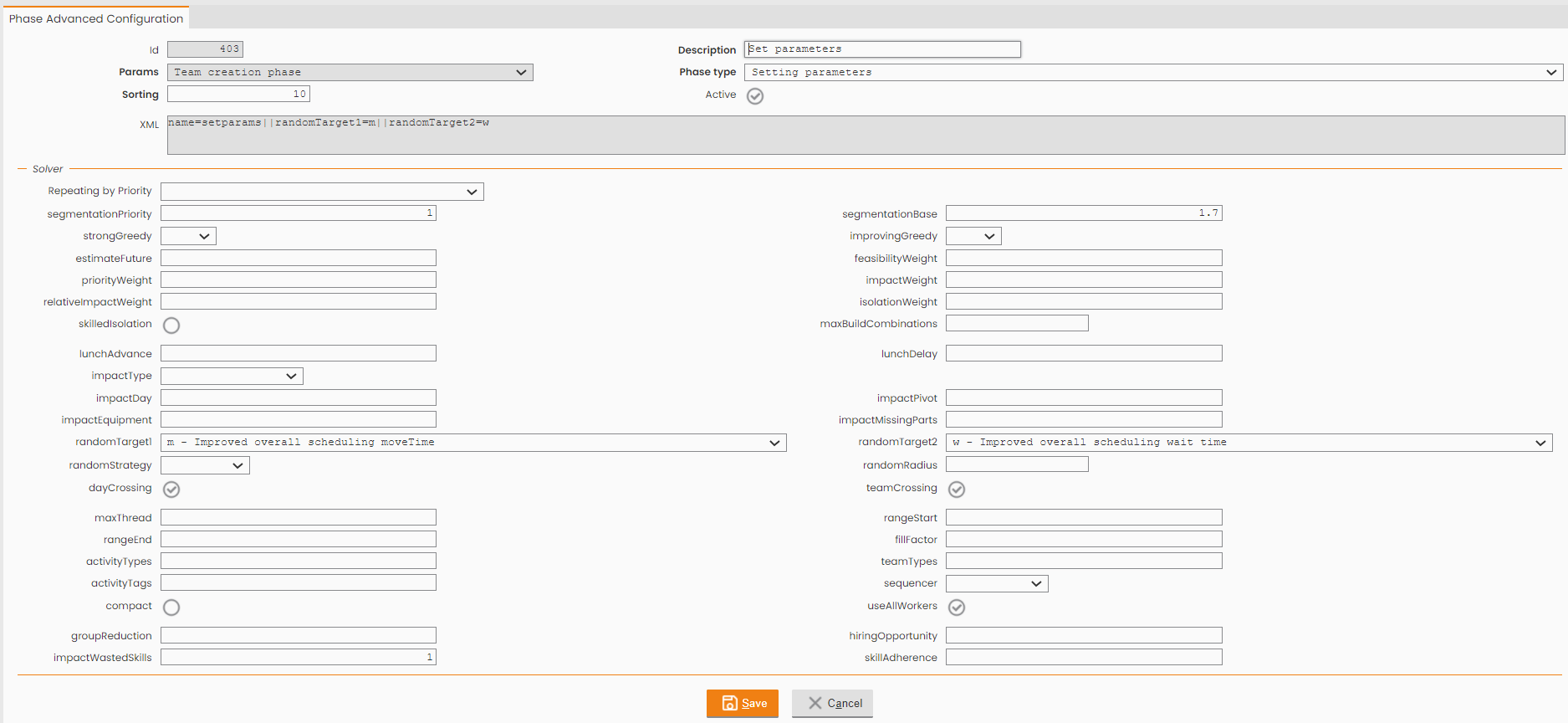
Setparams (setting parameters): sets the parameters for the next phases (unless they are overwritten). Phase to be repeated each time an assignment phase is performed;
-
Assign (simple assignment): greedy assignment phase only.
This algorithm performs a first cycle of allocation by assessing the criticality of each activity for each individual resource and then assigning the most critical activity to the most convenient resource.
The criticality is calculated in accordance with heuristics based on concepts such as feasibility (or compliance with time constraints), impact (that is the deterioration of the final solution in terms of lost time), priority (precedence rules), etc. The Gisware allows to configure the weights for each parameter used by the function in order to change the behaviour of this first assignment phase by (for example) giving more importance to the impact or the priority or other parameters.
The result of this step is a list of assigned activities for each resource.
-
TSP: local optimization.
With respect to the constraints of activities assigned to a single resource, it allows to optimize the execution order of the activities and then perform a TSP calculation, saving time and optimizing routes.
-
Acr (optimized assignment): Assign-Compress-Repropose; combination of the phases of assign and tsp (OR with assign and cacrb and cxb); It could be used as a further step to integrate the already composed teams. it requires the cyclical iteration of assignment and optimization phases, as well as the reintroduction of activities. This phase does not require any attributes.
-
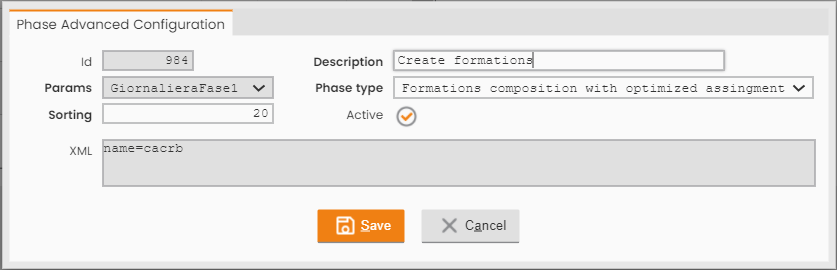
Cacrb (formation composition with optimized assignment): Clear-Assign-Compress-Repropose-Build; the combination of team composition and acr phases (OR with assign and acr and cxb). It requires the cyclical iteration of the phases for clearing the activity list, running the acr cycle (assignment, optimization and reintroduction) and dynamically creating teams.
-
Racrb: Repropose-Assign-Compress-Repropose-Build; Unlike the <cacrb> phase, it provides for the dynamic creation of a team, to be then followed by the assignment of the activity list, not requiring to clear the solution every time a new team gets created. This technique allows to reserve all available slots, without editing any previous scheduling. The standard approach is the multiple-phase problem-solving one, which first assigns a given activity type from the list, then another type and ultimately the overall remaining activities.
-
Cxb (complex formation composition): the combination of automatic team composition and reiteration of acr and 'random moves' (OR with assign and acr and cacrb). It provides for the nested use of phases in case sub-phases are allowed. It requires the cyclical iteration of the activity list clearing (c) and of the phases listed as sub-phases as well as of the dynamic creation of teams (b). Please consider the following specified input: <phase name="cxb"> <phase name="acr" /> </phase> with this input definition corresponding to the running phase cacrb.
-
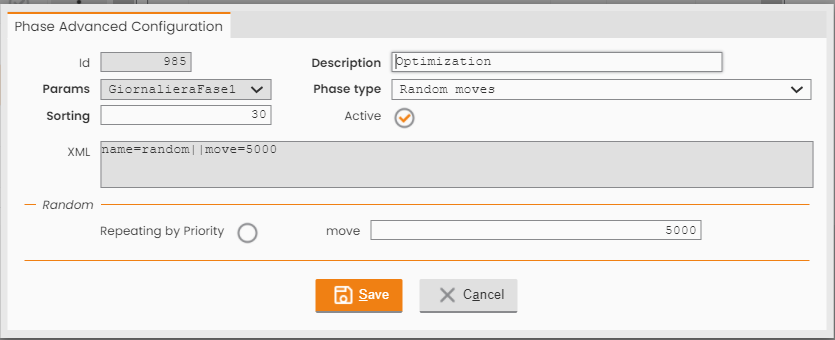
Random moves: the execution of random moves (optimization with exchange between resources and days).
This phase uses an algorithmic component that uses various heuristics and random techniques to improve displacements, eliminate unwanted combinations and increase the final quality of the solution.
This methodology includes:
-
various objectives for the exchanges of activities between two resources
-
local optimization algorithms to evaluate weather such excange is conveninet or not
-
-
VRP (full optimization process): the full algorithm execution (not used, it would use the same parameters for all phases (phases used: setparams; acr; random moves).
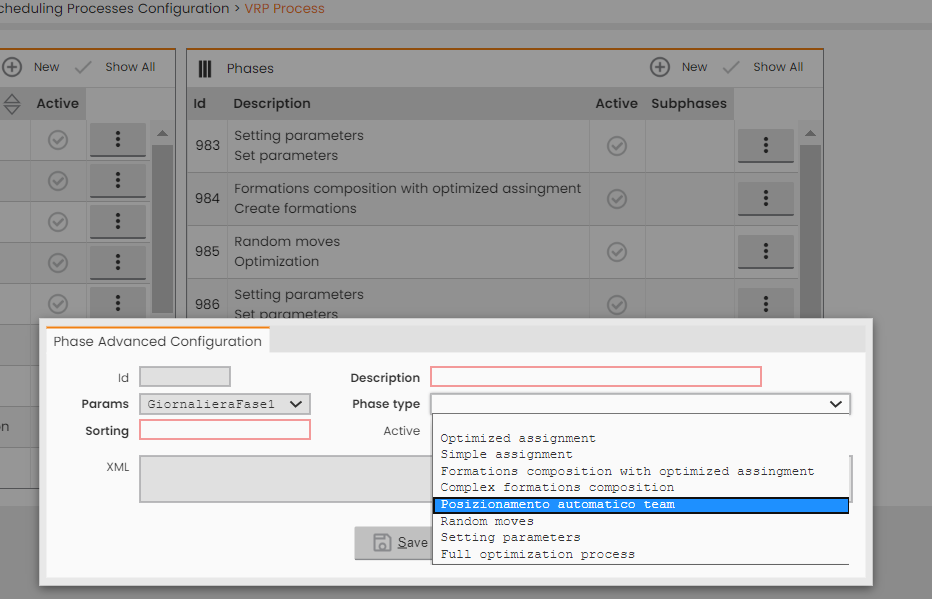
|
|---|
|
Figure - Advanced Configuration |
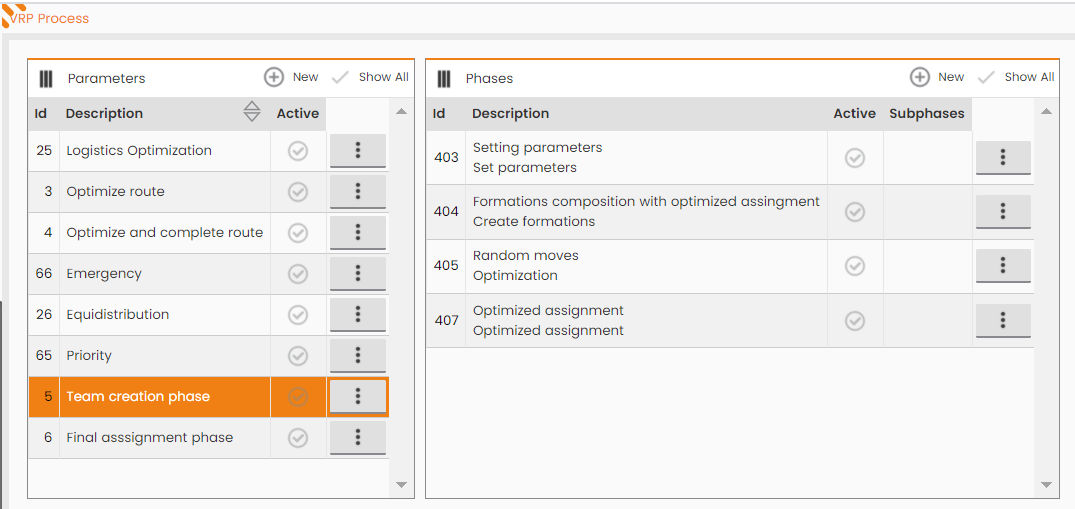
Usually, in a Team Creation optimization process are defined the following phases:
|
|
|---|
-
First phase: Setting parameters (Setparams): mandatory phase, where to define the main weights to take in charge in the scheduling processing
|
|
|---|
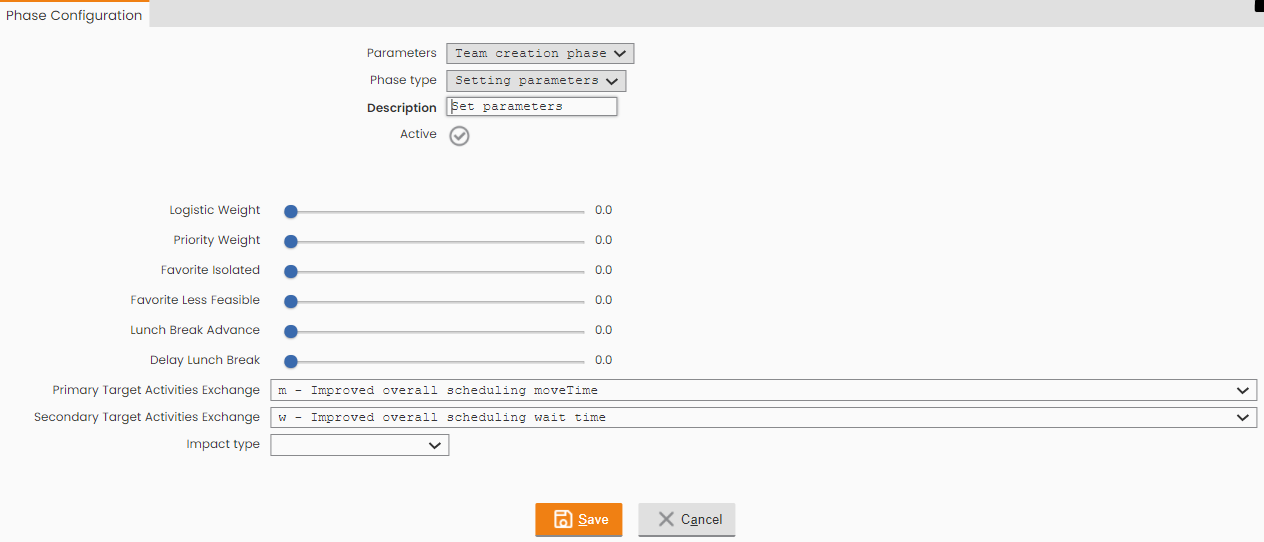
all available parameters to use in the scheduling processing:
|
|
|---|
-
Second phase: Formation Composition (Cacrb). If Formations are not used, to use 'acr' phase.
|
|---|
-
Third phase: Random moves phase:
|
|
|---|
-
Last phase: Optimized assignment (acr) phase:
|
|
|---|
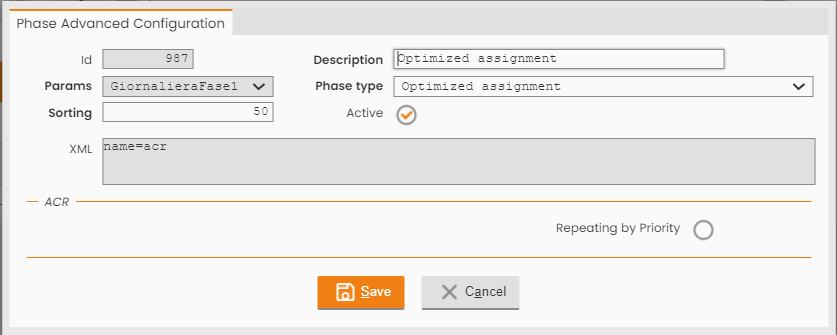
The property 'Repeating by Priority' is very important and it's used to process the elaboration for the pool of tasks/interventions with the same priority and starting from the highest priority tasks.
Call to the VRP OSS service (activity performed for each step of the automatic elaboration process)
Calling the OSS service and evaluating the Response.
In case of a blocking error in the elaboration of each step above, the process is interrupted. If necessary, the process in error is re-processed when elaboration is started automatically (from calendar).
Monitoring / Logging activities
Counter and Scheduling Log management. In the logs are reported reasons for the exclusion of resources/team.