
The Branch configuration on which to execute the VRP Engine is a compulsory step of the VRP overall setting.
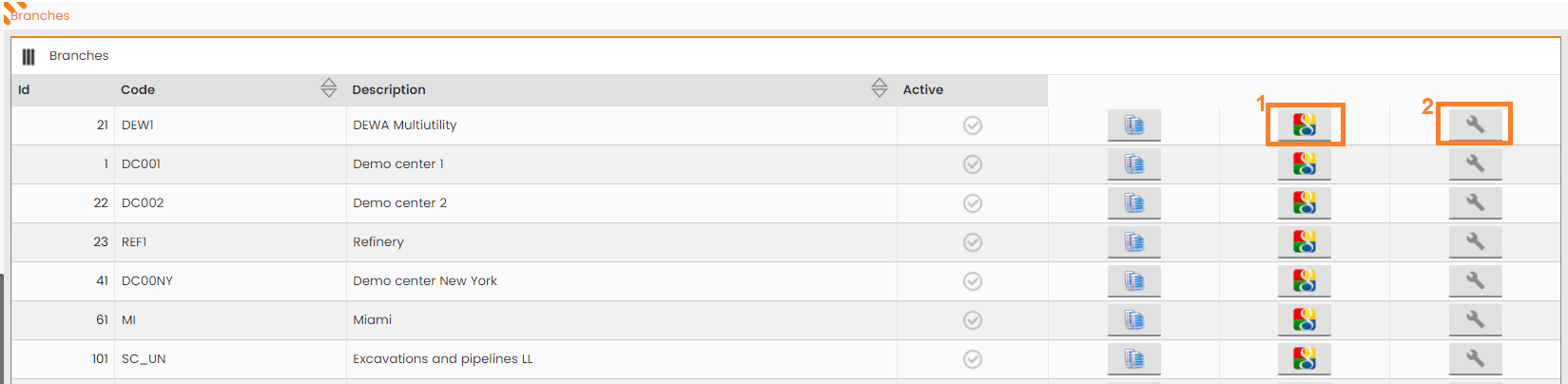
MAIN MENU → CONFIGURATION → SCHEDULING OPTIMIZATION → OPERATIONS CENTER
|
|---|
|
Figure - VRP Configuration for single OC |
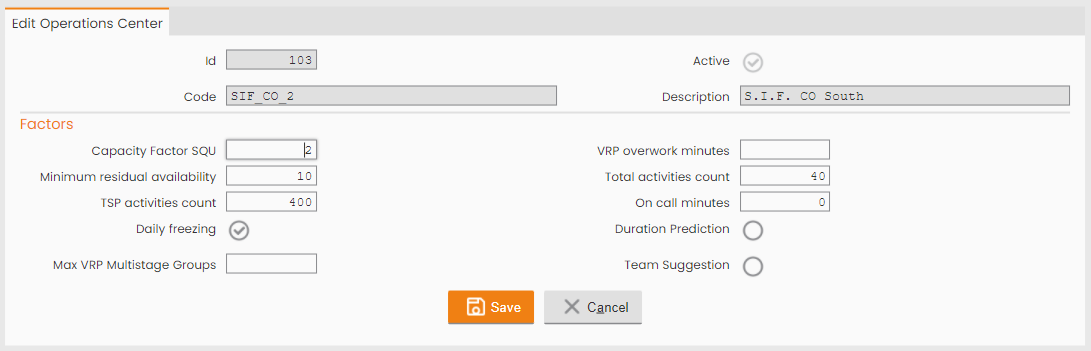
By clicking on the single Operation Center, several properties used in the VRP process have to be filled:
|
|---|
|
Figure - VRP Branch properties |
Table AOPERATIONCENTER (all showed fields in the image above are in bold)
|
Column name |
Description |
|
AOCEID |
PK |
|
AOCEID_ACOM |
company |
|
AOCEDESCRIPTION |
Description |
|
AOCECODE |
code |
|
AOCEISACTIVE |
flag active |
|
AOCEPRIORITYFACTOR1 |
priority factor 1 - Not Used |
|
AOCEPRIORITYFACTOR2 |
priority factor 2 - Not Used |
|
AOCEPRIORITYFACTOR3 |
priority factor 3 - Not Used |
|
AOCEPRIORITYFACTOR4 |
priority factor 4 - Not Used |
|
AOCEPRIORITYFACTOR5 |
priority factor 5 - Not used |
|
AOCECAPACITYFACTORINTRESOURCE |
capacity factor internal resource - NOT USED |
|
AOCECAPACITYFACTOREXTRESOURCE |
capacity factor external resource - NOT USED |
|
AOCECAPACITYFACTORTEAM |
capacity factor team (Capacity Factor SQU) |
|
AOCETERNARYACTIVITIESCOUNT |
number of ternary activities - NOT USED |
|
AOCEVRPADDEDACTIVITYCOUNT |
(AFILOTTNUMATTCALCDIST) number of activities added by VRP - NOT USED |
|
AOCEOPTSCHEDMINAVAIL |
(AFILINTSQDISPMINSAT) minimum residual availability for VRP optimization and for optimization and integration |
|
AOCEOPTADDEDACTIVITYCOUNT |
(AFILINTSQNUMATTAGG) minimum number of tasks assigned for VRP optimization and for optimizing and integrating |
|
AOCEOPTSPACTIVITYCOUNT |
(AFILINTSQNUMATTCALCDIST) number of tasks taken from the TSP loading task for the resource optimization and integration process |
|
AOCEOPTWORKDAYSCOUNT |
NOT USED |
|
AOCEINTTEAMSCHEDMINAVAIL |
minimum team availability for Post-VRP optimization and for optimization and integration - NOT USED |
|
AOCEINTTEAMADDEDACTIVITYCOUNT |
minimum number of tasks assigned to the resource for Post-VRP optimization and for optimizing and integrating - NOT USED |
|
AOCEINTTSPTEAMACTIVITYCOUNT |
number of tasks taken from the TSP task for the optimization and integration process for teams - NOT USED |
|
AOCEINTTEAMWORKDAYSCOUNT |
not used |
|
AOCEISSCHEDULINGACTIVE |
active scheduling flag - NOT USED |
|
AOCEISDAILYFREEZING |
daily freezing flag. It allows to change (paste, remove) scheduling in the past |
|
AOCEOSSOVERTIME |
overtime/on call minutes allowed for the operational resources on the branch/operating center; default = 0 min. |
|
AOCERTREPRADDEDACTIVITYCOUNT |
number of updated activities reelaboration - NOT USED |
|
AOCEADMITTEDOVERTIME |
on call minutes allowed - NOT USED |
|
DurationPrediction |
Flag to enable Duration prediction AI feature |
|
Max VRP Multistage Groups |
Number of tasks to consider in the MST building |
|
AOCEISTEAMSUGGESTIONENABLED |
Team Suggestion flag to enable AI Team suggestion feature |
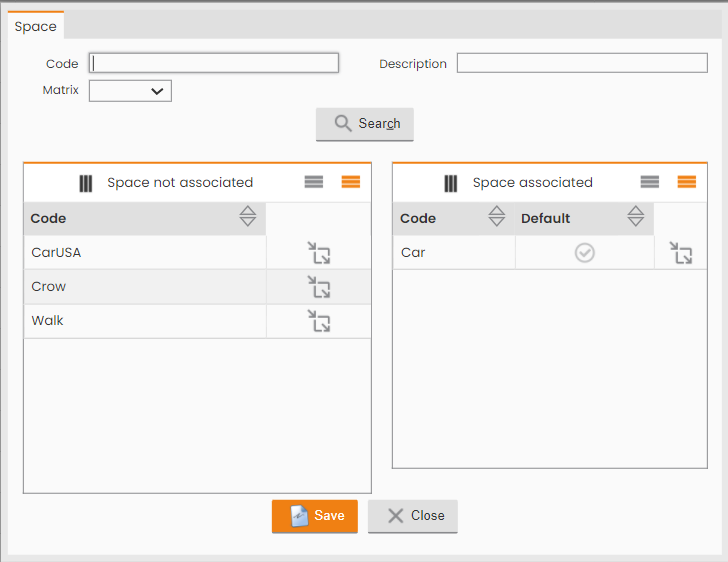
By clicking on SPACE Button (Icon 1, Figure VRP configuration for single OC), the vehicle to be used by the scheduling Engine has to be defined:
|
|---|
|
Figure - Vehicle to be used |
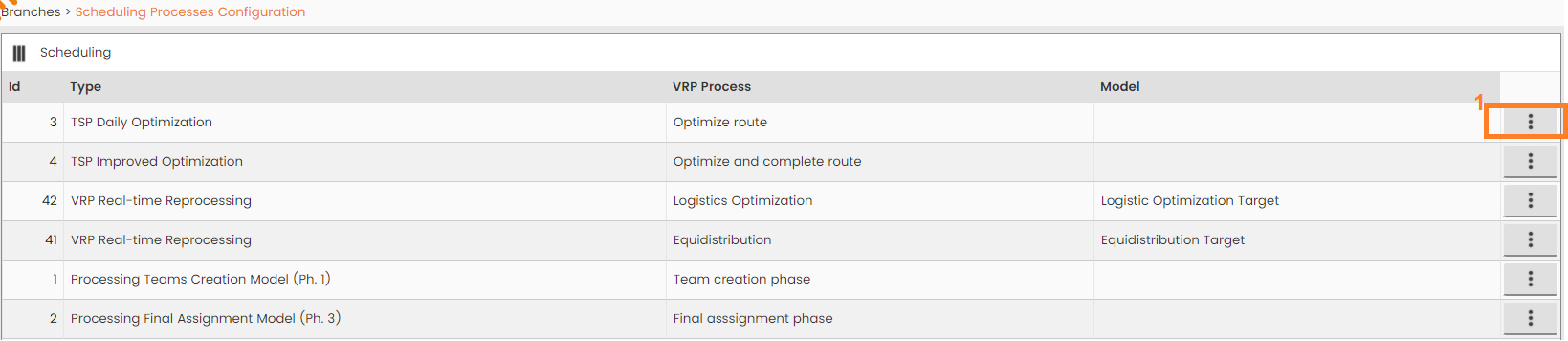
By clicking on SCHEDULING Button (Icon 2, Figure VRP configuration for single OC), the VRP process to be used has to be defined:
|
|---|
|
Figure - VRP process for the sigle Next-Gen FSM Platform functionality |
Type: it indicates the Next-Gen FSM Platform functionality where to use VRP process.
-
TSP Daily Optimization: it allows to assign a VRP process to the ‘Optimize’ functionality of the Daily Plan;
-
TSP Improved Optimization: it allows to assign a VRP process to the ‘Optimize and Integrate’ functionality of the Daily Plan;
-
VRP Real-time Reprocessing: it allows to assign a VRP process to the Real-time process;
-
Processing Team Creation Model (Ph. 1): it allows to assign a VRP process to the first phase of virtual plan scheduling;
-
Processing Final Assignment Model (Ph.3): it allows to assign a VRP process to the third phase of virtual plan scheduling;
VRP process: VRP process to assign to the specific Next-Gen FSM Platform functionality;
Model: optional - specific scheduling Model to consider in the VRP process
By clicking on OPERATIONS button (icon1, Figure - VRP process for the sigle Next-Gen FSM Platform functionality), it’s possible to configure the VRP process to be used by all the Operation Centers.