
In the FSM Platform - Gisware integration, the most important VRP parameters to set up are:
|
Parameter |
Value - Note |
|
Solver |
The <solver> node allows you to define the processing procedure (composition of the sub-phases of greedy assignment, local optimization, random moves, etc.…) and the work parameters that must be applied by the optimization engine to solve the problem. The parameters listed at the <solver> level are used in the pre-assignment phase. |
|
Matrix |
cache Matrix to consider by the optimization engine to solve the problem. F (full stereo) → information on Travel and Distance between two points; f (full mono) → information on Travel between two points; S (smart stereo) → compressed information on Travel and Distance between two points; S (smart mono) → compressed information on Travel between two points; |
|
Vehicle |
|
|
AI Configuration |
Property supported by Next-Gen FSM Platform 10 –> GISWARE 13 Property used for AgendaAffinity/ML-precision intraday scheduling feature Before the actual call to Gisware, Next-Gen FSM Platform will generate the presigned URLs pointing to the .gz / tar.gz file for the Model, Orders List, cluster mapping:
Next-Gen FSM Platform calls Giswsare and sends the presigned URLs through which Gisware will be able to access the model (through the EdgeAI) and invoke the predictions on the agendas it has composed. <AIConfiguration>
|
|
team |
ObjectID related ARSHID of the Table ARESOURCESHIFT - ID of the foreman It identifies single team or predefined/static crews.
(
) The working schedule is defined by the following elements, being <days> children:
TeamType: attribute used for the management of preassigned activities. It's used for in connection with the ActivityType. Change LOG GC 10: Property meaning changed by Next-Gen FSM Platform 10 - GISWARE 13 The Tag Team used for single resources (NOT IN TEAM) and for predefined Crews. The team will contain as child nodes the list of workers that make it up. Gisware will send the unordered collection of the "names" of these workers to the AI module. It is not necessary for the worker to exist externally (as a single <worker> node), but if so, the Gisware will engage the worker making him unavailable for the team building phase. <team name="T1"> <worker name="001§WORKER1" /> <worker name="002§WORKER2" /> </team> |
|
worker |
Workers are a VRP entity that represents a member of a (potential) team not yet instantiated as a "team". (Property 'Not a team' in the Scheduling Model to be defined as 'false') Up to Gisware 11, the VRP can instantiate workers:
Starting from Gisware 12 (included), VRP can instantiate workers:
We therefore distinguish the three cases:
Change LOG GC 9.2: Property meaning changed by Next-Gen FSM Platform 9.2 - GISWARE 12 The meaning of the “<worker>” node has changed. To use it with the old meaning it is necessary to activate the "workersAsLineup = true" attribute in the "<problem>" node. <worker name="W35423">
</worker>
Change LOG GC 10: Property meaning changed by Next-Gen FSM Platform 10 - GISWARE 13 The "name" definition has changed. The worker comes into play as a child of the <team> or <lineup> nodes, or through the instantiation of a new team from a <formation>.
<worker name="1282§W8192">
|
|
Formation |
Potential team that can be instantiated <formation collectDivision="^SX-^SX-^SX,#3" collectSkills="S1,S2,S4,^SX#3" locate="f" maxNumber="1" name="F44100" reduce="t" skills="^I_T,^Z_T">
Change Log Next-Gen FSM Platform 10 - Gisware 13: worker definition has changed. <formation collectDivision="^SX-^SX" collectSkills="^SX#2" locate="f" maxNumber="1" name="F30100" reduce="n" skills="^I_T,^Z_T">
|
|
reduce |
This is the attribute to be used to reduce the availability of the Formation based on the availability of technicians It allows you to schedule Formations in the case of workers with reduced working hours. It is possible to indicate the following values: n: Formation for the working day is not created; s (skills reduction): the skills of the worker in question are removed from the entire TeamDay. Therefore, considering a subset of the skills, the working day for this Formation is scheduled as if the worker is not assigned to the activities. t (time reduction): team work time is reduced so that the worker with reduced working hours can contribute equally to the day's work activity. In this the whole team would end the work shift early; which can be inconvenient for large teams. |
|
locate |
It indicates which address to consider: the one related the formation or the one related the worker. Admitted values: f, w |
|
dislocation |
It is used to tell the system how to manage the calculation of the distance between two points that have at least one entrance or exit made up of multiple locations. The allowed values are: max: chooses the combination of points with the greatest one from the calculated distances; min: it chooses the combination of points with the smallest one from the calculated distances. |
|
MaxNumber |
maximum number of formations that can be instantiated of that type. The default is 1. |
|
activity |
ObjectID related Property AWOOID of the Table AWOOPERATION
Change LOG GC 10: Property changed by Next-Gen FSM Platform 10 - GISWARE 13 name=”001§TEXT” where:
<activity name="001§ACTIVITY_1" /> 2<activity name="§UNAVAILABILITY" /> Therefore, AI module receives '001§ACTIVITY_1'and has to be considered only the first part 001 |
|
lunchworking |
Parameter used to include lunch break into the scheduled work order or not. Configuration to be done for the single Activity. |
|
formative |
Boolean attribute. It gives the possibility to allow (true) or not (false) that the activity is included, with due priority, in the formation of dynamic teams. The default is true. |
|
minDurationEnd - minDurationStart |
Minimum duration related the first day and last day for multi-days work orders |
|
policy |
Parameter used to identify multi-days activity; Value: heavy |
|
days |
Parameter used to define beginning and end of the scheduling period |
|
timeConstraintsWeight |
Property supported by Next-Gen FSM Platform 10 - MST → GISWARE 13 Default value is '1'. It contributes to reduce the feasibility of activities belonging to an MST by using the following math expression: Feasibility value / (1 + number of related dependencies * weight) In other words, the feasibility of a stage belonging to an MST is divided by the number of successors it has. This divider is multiplied by this weight. So if timeConstraintsWeight is equal to 0, the feasibility is not divided by this divisor. It is possible to control the reduction of feasibility by setting the weight between 0 and 1 (or greater if needed), where:
|
|
timeConstraints |
Property supported by Next-Gen FSM Platform 10 - MST → GISWARE 13 <timeConstraint activity1="7189" activity2="7190" offsetMax="MAXm" offsetMin="180m" requiredAssignment="true-false" type="end-start"/> Type: type of time dependency: start-start; end-start; sameDay RequiredAssignment="true-false" → true means that the first activity has to be scheduled. False means that the second one is optional. Offset min (EarlyStart) → "MIN", "-MIN" (value 'MAXM' means for ever; value 'MINm' means 'from ever'; value 0 only for same day dependency) Offset max (LateStart) → "MAX", "-MAX" (value 0 only for same day dependency) |
|
workersAsLineup |
Property supported by Next-Gen FSM Platform 9.2 - GISWARE 12 Values: True/False. Attribute of the 'Problem' section that indicates whether to adopt the new scheduling mode with the Team suggestion or the "old" mode. By enabling this feature, workers are considered eligible for Lineup compositions. The meaning of the “<worker>” node has changed. To use it with the old meaning it is necessary to activate the "workersAsLineup = true" attribute in the "<problem>" node. |
|
affinityFoster |
Property supported by Next-Gen FSM Platform 9.2 - GISWARE 12 Attribute of the 'Solver' section and of the setparams phase that indicates the affinity's weight to be used during the selection of the team |
|
lineup |
Property supported by Next-Gen FSM Platform 9.2 - GISWARE 12 Entity that represents the team historically used or created in the system. The FSM transfers the activities on which to perform automatic scheduling to the VRP. The historical DISTINCT teams associated with these activities are then taken from the affinity table, and for each historical DISTINCT team the lineups are populated accordingly,
Property supported by Next-Gen FSM Platform 10 - GISWARE 13 The lineup will contain as child nodes the list of workers that make it up. Gisware will send the not sorted collection of the "names" of these workers to the AI module. It is not necessary for the worker to exist externally (as a single <worker> node), but if so, the Gisware will occupy the worker making it unavailable for the team building phase.
<lineup name ="nameLineup"> 2 <worker name="001§W" /> 3</lineup> <lineup locate="w" name="L-1063§W7366,1064§W7511" reduce="t">
|
|
affinity |
Property supported by Next-Gen FSM Platform 9.2 - GISWARE 12 The affinities (= ASSIGNED_PREDICTED) between team / lineup and activity are then reported. For each "team" (intended as a default team that is passed to the VRP) there will therefore be the representation as <team ...>, where the affinities with the activities to which it is associated will be specified, based on the predictions returned by the AI module. The same procedure is applied to each "lineup", which will however be represented as <lineup ...>, but with similar content. In case a "team" is also a "lineup", we simply report its affinities as <team ...>.
<affinity> <team name="team1"> <activity name="ACT1" value="1" /> <activity name="ACT2" value="0.5" /> <activity name="ACT3" value="0.7" /> </team> <lineup name="lineup1"> <activity name="ACT1" value="0.1" /> <activity name="ACT7" value="1" /> </lineup> </affinity> |
|
PreAssignFix |
Default Value 'n'. Parameter used in the management of the team and its pre-assigned activities. In the 'Update and Re-actualize' call, it indicates the number of activities that cannot be unscheduled.to the technician |
|
preAssignMode |
Values: aon / aog. Attribute to be used if pre-assigning activities in terms of <days>. |
|
respectTimeConstraints |
Property supported by Next-Gen FSM Platform 10 - MST → GISWARE 13 Type od dependency: weak | strong. Strong - pre-assigned activities involved in time dependencies (that are pre-assigned to a team in the given working day) are not removed only if it is possible - always according all the other constraints (skills, availability, ...). If only one related time dependency is not satisfied, the preassigned activity involved in the dependency is removed. It is the default value of the attribute. Weak - pre-assigned activities involved in time dependencies (that are pre-assigned to a team in the given working day) are NEVER removed even if related time dependencies are not satisfied. As a result, the activity B, with a violated time dependency with activity A, will not be scheduled while A will remain pre-assigned.
<team name="ROSSI" preAssignMode="aon"> <days dislocation="max" from="01/12/2022" skills="S1,S4,^SX,^Z_T,^I_T,^P,^T1" to="01/12/2022"> <location ll="25.763104,-80.197847" type="start"/> <location ll="25.763104,-80.197847" type="end"/> <location ll="25.763104,-80.197847" type="pivot"/> <slot end="17.00" start="08.00"/> <activity name="B1" respectTimeConstraints="weak"> </days> </team> |
|
DefaultActivityEndSlot |
Property supported by Next-Gen FSM Platform 10 - GISWARE 13 <problem> attributes called DefaultActivityEndSlot and DefaultTeamEndSlot in order to decide the values of end's time's slot when it is not explicit. The default values of these attributes are DefaultActivityEndSlot='48.00' and DefaultTeamEndSlot='24.00' in order to maintain the same response that is returned before this update. Both the attributes can be defined with the same value using the attribute called DefaultEndSlot. These parameters give the option to reduce the end of default slots to 24 hours for requests whitout night shifts. If the default end slot is not reduced, it is possible to receive an error response caused by the new management of overlapped slots introduced with this major release. For example the activity has an input like this: 
the input without new problem attributes creates a time slot for 27/03/2022 day that starts from 00.00 and ends to 48.00. So the part of this time slot that starts from 24.00 and ends to 48.00 is overlapped to 28/03/2022 day and overwrites the appointment defined in explicit time slot inside the definition of 28/03/2022 day. |
|
DefaultTeamEndSlot |
Property supported by Next-Gen FSM Platform 10 - GISWARE 13 rifer to DefaultActivityEndSlot attribute |
|
SegmentationPriority |
Default Value - 1 |
|
SegmentationBase |
Default Value - 1.7 |
|
strongGreedy |
Parameter for launching a greedy with integrated tsp. This modality provides for the assignment of activities which would exceed the day considered if relying on the greedy algorithm; the tsp organizes them as to schedule the overall activities over the day. Possible values are:
|
|
feasibilityWeight |
Parameter for increasing/decreasing the feasibility weight of an activity when calculating its criticality. The default value is 1.
|
|
priorityWeight |
Parameter for increasing/decreasing the priority weight of an activity when calculating its criticality (as to integrate the activity feasibility). The default value is 0.
|
|
impactWeight |
Parameter for increasing/decreasing the impact weight of an activity when calculating its criticality (as to integrate the activity feasibility). The default value is 1. Heavy impact weight --> the VRP assigns the closest activities (minimize displacements - cut down on overall mileage). Set low criticality value for low impact activities. |
|
relativeimpactWeight |
Parameter used to increase or decrease the impact weight of an activity in relation to its duration in the calculation of its criticality (it integrates the feasibility of the activity). The default is 0. |
|
Impact pivot |
If increased it gathers activities in a given central/reference point, which is the pivot.
|
|
isolationWeight |
Parameter for increasing/decreasing the isolation weight of an activity when calculating its criticality (as to integrate the activity feasibility). The default value is 0.
|
|
(fidelityWeight) → deprecated FidelityFoster |
Available factor for minimizing the impact of a team over the greedy phase, based on the established best practices of the group the activity to be assigned belongs to. To be used with the fidelityGroup attribute referring to <activity>. The default value is 1. The higher its value, the higher the chance to assign a preferred team |
|
lunchAdvance |
Coefficient - usually a value included between 0 and 1, except for given specific needs - to determine the lunch-break advance margin. If the value is 0, the lunch-break may not be anticipated; if the value is 1, the lunch break may be anticipated by a time equal to its duration. The default value is 0.5, which determines a lunch-break anticipation margin equal to half its duration. |
|
lunchDelay |
Coefficient - usually a value included between 0 and 1, except for given specific needs - to determine the lunch-break delay margin. If the value is 0, the lunch-break may not be delayed; if the value is 1, the lunch break may be delayed by a time equal to its duration. The default value is 1. |
|
impactDay |
When calculating the impact generated by the assignment of an activity to a team on a given day, this value is only added if the team has no further activities to perform over the day considered. The goal is to penalize the opening of new days. |
|
impactWastedSkills |
This parameter impacts on the approach used for selecting the most suitable team for performing an activity.The value is an integer number to be expressed in minutes. The parameter's default value is zero, which implies that no weight penalizes the level of skills. If the parameter is valued, then the following strategy is used to weigh skills:
Default value: 0 Skill Level Management--> high impactWastedSkills parameter --> selection of resources with higer skill level (= lower number) and with few wasted skill |
|
skillAdherence |
The default value is 1. Used when calculating the formation score; in further detail, it acts as a score factor. The score measures the formation's ability to perform the activity being considered from time to time; the higher the score, the better the formation. The score gets penalized by skillAdherence, which is due to the abundance or uselessness of the formation skills (wasteCost). |
|
skillDeficiency |
It defines the weight in terms of inability of a team/worker in complying with the skills required for a given activity as calculated by the waste value. Deficiency example: the activity requires the "S1" skill but the team only provides the "S1°2" one (second level S1). The default value is 1. The value referred to this parameter and to its skillExcess equivalent should be included between 0 and 1. If the problem involves a possible large number of deficiencies and few possible wasted skills, then it is best to use a small value of skillDeficiency (like 0.2) to have a good balance between the deficiency value and the excess value. Instead, to increase or decrease the weight of wasteCost, you can use skillAdherence or impactWastedSkills depending on the phase where you want to apply the change. |
|
skillExcess |
It defines the weight in terms of excessive ability of a team/worker in complying with the skills required for a given activity as calculated by the waste value. Overskilled/excess example: the activity requires the "S1" skill but the team also provides the "S2,S3,S4,S5" ones. The default value is 1. The value referred to this parameter and to its skillDeficiency equivalent should be included between 0 and 1. If the problem involves a possible large number of wasted skill and few possible defiencies, then it is best to use a small value of skillExcess (like 0.2 or 0.1) to have a good balance between the deficiency value and the excess value. Instead, to increase or decrease the weight of wasteCost, you can use skillAdherence or impactWastedSkills depending on the phase where you want to apply the change. |
|
exclusionGroup |
This attributes specifies the name of the mutual exclusion group the activity belongs to. Therefore, upon assigning an activity belonging to the exclusionGroup, all further activities belonging to such group are removed from the list and not subject to any scheduling. Parameter used to manage 'preferred' Team scheduling |
|
fidelityGroup |
The related value requires the name of a group for inserting the set of activities to be scheduled to the same team. Thus, whenever an activity belonging to a fidelityGroup gets scheduled, the team it is associated with gets included among the fidelity ones related to this group; each time the assignment of an activity belonging to the same group is required, all fidelity teams (with at least one group activity assigned), become preferred teams reducing their impact through the fidelityWeight factor, specified among the parameters. For further details, please go to the Parameters section for the <setparams> settings. When using fidelity teams we recommend to set the fixedTeam value as a constraint of the <activity> belonging to a fidelityGroup, as to provide for the random exchange of activities over the days referring to a same given team, not allowing any exchanges with different teams, though. As a matter of fact, this management mode is not impacted by the weight of this attribute and the exchange among fidelity teams is not supported. |
|
randomTarget1, randomTarget2 |
Used in case of random actions and determining what required actions are useful to improve the resulting scheduling. They may acquire the following values (low-case letters refer to the overall scheduling, while upper-case ones refer to forthcoming days to the detriment of future ones):
Change LOG Next-Gen FSM Platform 10: Property supported by Next-Gen FSM Platform 10 - GISWARE 13
It is also possible to combine multiple values. In that case, the move will be accepted if there is no deterioration for each parameter and at least one improvement on one of them. For example, if the "ma" parameter is used, the move will be accepted if neither the 'movement' nor the 'affinity' has worsened and if at least one of the 'affinity' and 'movement' has improved. |
|
randomRadius |
This parameter may be associated with the expansive value of the randomStrategy attribute, to define the range for the random extraction of activities related to random actions. the attribute acquires the value included in the [0 - 1] interval, its default value being 0.3.
|
|
impactType |
Evaluation modality of the impact of a ith ai activity when considering its assignment to a given jth dsj DaySlot (as in the greedy phase). The following values are allowed:
Starting with release 9.1, the default has changed from connectDistance to worseningDistance. 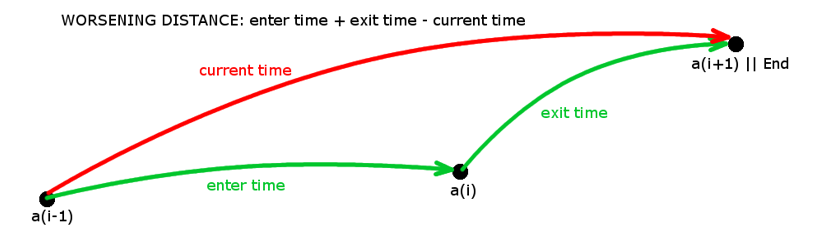
|
|
dayCrossing |
boolean for enabling the exchange of activities over different days, following a random action. |
|
teamCrossing |
boolean for enabling the exchange of activities among different teams, following a random action. If true, activities can be exchanged among different teams, if false the activities may only be exchanged over different days for the same team. The default value is true. |
|
fill factor |
If value = 100, the 100% of the day gets filled. Not considered by random actions only in the assignment phase "solo_ acr" ( by default already set at 100) |
|
activity types |
Filter used for choosing the activities subject to the greedy phase and to that referring to the random exchange of activities. Compared to the activityTags, it does not accept in/or clauses but it authorizes type calculation. For example: "CHIUSURACONTATORE=5, APERTURA CONTATORE=2".
public static final String TIPO_ATT_BLOCCATA = "BL"; public static final String TIPO_ATT_SATURAZIONE = "SA"; public static final String TIPO_ATT_SATURAZIONE_SCADUTA = "SASCAD"; public static final String TIPO_ATT_ASSEGNATE = "AS"; // pre-assigned activities in case of optimize/re-calibrate or multi-day activities as for model processing public static final String TIPO_ATT_ASSEGNATE_FIRST = "ASFIRST"; // pre-assigned and in progress activities in case of optimize/re-calibrate (attività preassegnata ed in corso nel caso di ottimizza/ritara (to maintain as before) public static final String TIPO_ATT_INDISPONIBILITA = "IN";// public static final String TIPO_ATT_ASSOCIAZIONE_BASE = "AB"; //no longer used (previous Italgas management of the constraint among Agenda - Booking and scheduling resource public static final String TIPO_ATT_ASSEGNATA_INT_SQUADRA = "ISQ"; public static final String TIPO_ATT_ASSEGNATA_INT_RIS_SINGOLA = "IRS"; public static final String TIPO_ATT_REALE_PREASS_AGENDA = "PREAG"; public static final String TIPO_ATT_REALE_PREASS_BLOCCATA = "PREBL"; public static final String TIPO_ATT_REALE_PREASS_SATURAZIONE = "PRESA"; public static final String TIPO_ATT_REALE_PREASS_SAT_SCADUTA = "PRESASCAD"; public static final String TIPO_ATT_REALE_PREASS_PLURI_GIOR = "PREPLURI"; public static final String TIPO_ATT_REALE_PREASS_PLURI_GIOR_SQ = "PREPLURI_SQ"; public static final String TIPO_ATT_REALE_PREASS_AGENDA_SQ = "PREAG_SQ"; public static final String TIPO_ATT_REALE_PREASS_BLOCCATA_SQ = "PREBL_SQ"; public static final String TIPO_ATT_REALE_PREASS_SAT_SQ = "PRESA_SQ"; public static final String TIPO_ATT_REALE_PREASS_SAT_SCAD_SQ = "PRESASCAD_SQ";// public static final String TIPO_ATT_IN_CORSO = "IN_CORSO";// public static final String TIPO_ATT_IN_CORSO_SQ = "IN_CORSO_SQ"; public static final String TIPO_ATT_REALE_PREASS_ORDINATE = "PREFIX_ORDINATE";
public static final String TIPO_ATT_RT_MAI_SCAMBIARE = "MaiScambiare"; public static final String TIPO_ATT_RT_MAI_RIMUOVERE = "MaiRimuovere"; public static final String TIPO_ATT_RT_SOLO_SE_NON_FATTIBILE = "SoloSeNonFattibile"; |
|
useAllWorkers |
Boolean parameter (its default value being set to false) that forces the ultimate use of all remaining workers, even if they are useless. |
|
activityTags |
This parameter, already used in the greedy insertion phases as well as in the random transfer/exchange of activities, may be adopted – together with the tags parameter of activities – for the more efficient matching of complex filter logics, thus not requiring to explode the filter attributes into Cartesian products for the type attribute. The type attribute can only be used if only one type per activity is provided, the activityTypes filter does not accept in/or clauses although it authorizes type calculation, such as "CHIUSURACONTATORE=5, APERTURACONTATORE=2". In order to apply and conditions, the "," symbol gets used; while or conditions are identified by “|”. For example, if defining the activityTags as “T1,T2|T3”, only those activities reporting T1 tags and one tag between T2 and T3 will be reported. The tag writing order does not provide for different solutions; so there is no difference in writing “T1,T2|T3” or “T2|T3,T1”. |
|
rangeDrop |
This parameter limits the scheduling to a given date range. In further detail, if forcing the rangeDrop (its default value being equal to the fault's end day value), the activities must be scheduled within the date range included between the day the fault was reported and the day specified by the rangeDrop (therefore, no activities will be scheduled following the date specified by the rangeDrop). |
|
Skill |
In order to specify a skill level and cardinality, the following syntax is used: NOME_SKILL°n#m with 'n' specifying the level and 'm' the cardinality (that is the number of times a given skill is owned by a resource, as when the team counts two resources having the same skill).
|
|
metaskill |
The ones having the ^ character as a prefix (usually specifying the team's name, such as ^ROSSI), are only used for matching activity requirements to team availability and are costless.
|
|
timeScope, timeScopeStart, timeScopeEnd, timeScopePivot |
Tag team attributes. They are optional attributes used to indicate a minimum and a maximum time view for reaching the location associated with the team. The value must be expressed in seconds. The attribute must be indicated with two values, separated by a comma, indicating respectively the minimum and the maximum: timeScope = "min,max". It is also possible to indicate a single value: timeScope = "val" in which case the value is assigned to the maximum. Indicating a single value is therefore like indicating timeScope = “0,val”. If the minimum and maximum value coincide, then applying these attributes is like using a teleportation but limited within a certain range, established precisely by the value defined for the attribute. When it comes to calculating the time distance between two locations - for example between the location associated with the team and the one of an activity - the scope of both locations is taken into account; if the time distance is greater than the maximum value between the two max scope values for the locations in question, then the algorithm will return an infinite travel time between the two points (and therefore the point will not be taken into consideration for the scheduling) . If the point from which the point associated with the team is to be reached is at a temporal distance below the minimum temporal vision, then navigation between the two points takes place in zero time (as in the case of teleportation). If the user wants to differentiate the timeScope value for the starting point, for the arrival point and for any pivot point of the team, then the attributes to indicate are respectively: timeScopeStart, timeScopeEnd e timeScopePivot. |