
During the workload analysis phase, the planner user must create the perfect plan by properly balancing the workload against the available capacity. This involves shifting activities' hours from one period to another to maximize hours coverage while utilizing the available capacity to its fullest.
But how is the distribution of activities handled when they span a wide execution period?
For example, during the spring/summer period, there is a high demand for air conditioner maintenance activities. These tasks can be performed on any day between May and August. How is the workload distributed across these months?
In this case, there are two alternatives: equal distribution and weighted distribution.
Equal distribution
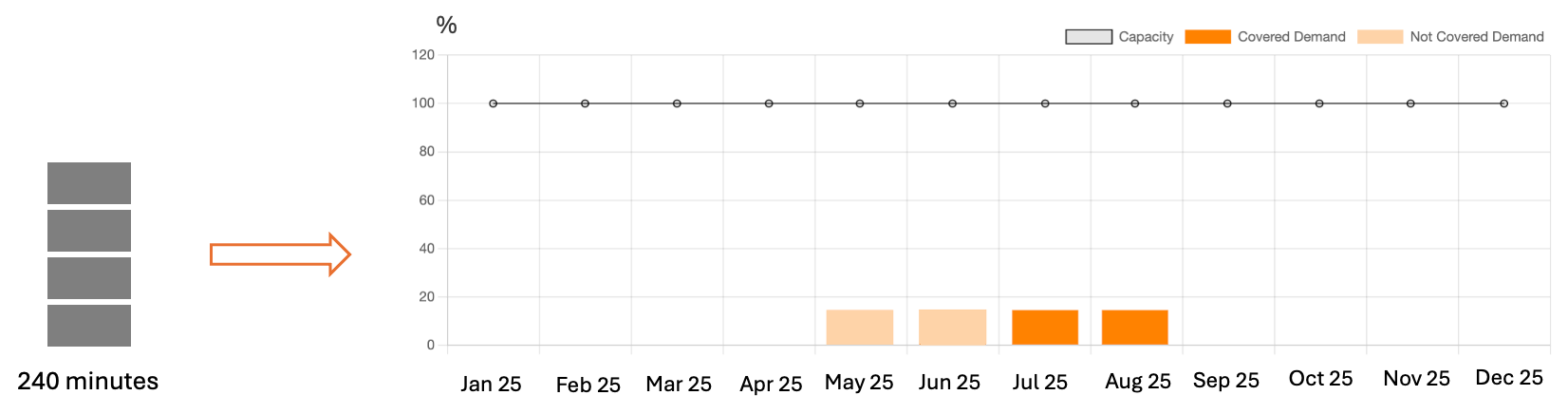
The Equal Distribution is the default option, applied to all Workload Analyses that do not have a defined "Workload Distribution Rule". It involves distributing the workload evenly across the entire duration.
|
|
|---|
For example, if a task has a duration of 240 minutes, a start date of 01/05/2025, and an end date of 31/08/2025, its duration will be evenly distributed over 59 days. This means the daily workload will be 240 minutes / 123 days = 1.95 minutes/days. As a result:
-
May’s workload hours = 60,48 minutes
-
June’s workload hours = 58,53 minutes
-
July’s workload hours = 60,48 minutes
-
August’s workload hours = 60,48 minutes
After this first distribution, the user can manually move the workload using the “Move execution dates” feature.
Weighted distribution
Weighted Distribution allows the workload to be balanced during the planning phase using rules different from equal distribution.
Let’s imagine the planner user needs to schedule maintenance activities for power poles, which are all set in the system with a start date of 01/01/2025 and an end date of 31/01/2025. These installations are located at high altitudes, where access is better during warmer months.
An equal distribution of the workload would allocate activity time across all months of the year. However, in this case, what is needed is a rule that allows certain periods to be excluded for specific activities.
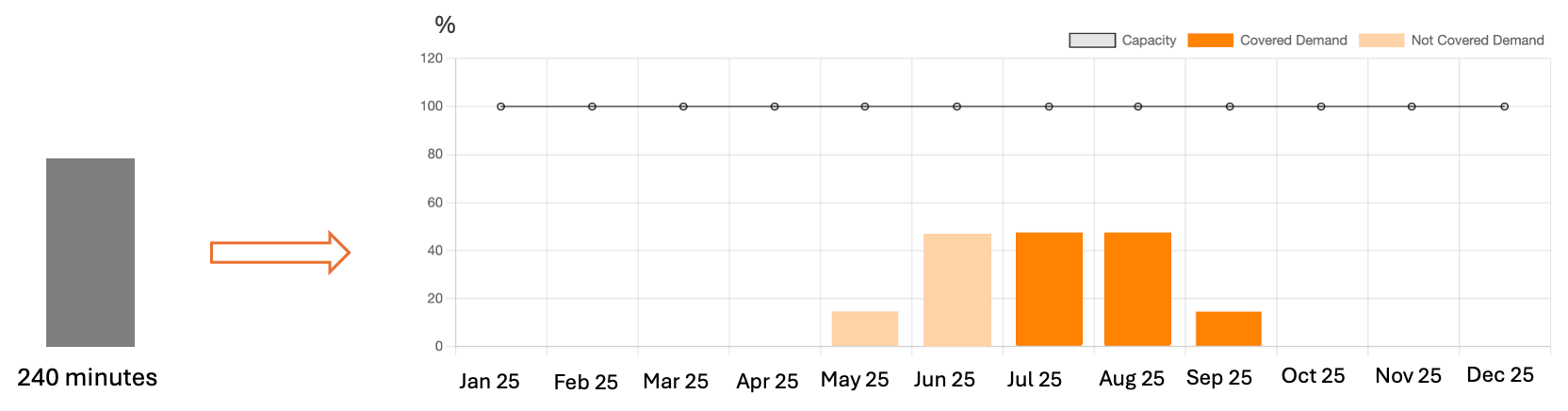
This can be achieved using Workload Distribution Rules.These rules allow the definition of workload distribution percentages across specific periods based on activity type, operation type, and urgency.
|
|
|---|
For example, in the scenario described above, the weighted distribution rule might be:
|
Activity type |
Period |
% Total workload |
|---|---|---|
|
High-voltage pole maintenance |
01/01 - 30/04 |
0% |
|
|
01/05 - 31/05 |
10% |
|
|
01/06 - 31/08 |
80% |
|
|
01/09 - 30/09 |
10% |
|
|
01/10 - 31/12 |
0% |
If a task has a duration of 240 minutes, using the rule above, its duration will be distributed in this way:
-
01/01 - 30/04 = 0 minutes
-
01/05 - 31/05 = 24 minutes
-
01/06 - 31/08 = 192 minutes
-
01/09 - 30/09 = 24 minutes
-
01/10 - 31/12 = 0 minutes
Inside each period, the distribution will be equal.
After this first distribution, the user can manually move the workload using the “Move execution dates” feature.