Introduction to the Booking Module
The Booking Module of the NextGen Platform is a real-time engine designed to manage, propose, and negotiate customer appointments. Instead of simply looking for "open gaps" in a technician's calendar, the module uses a territory-based predictive model to maximize field capacity, respect SLAs, and optimize travel routes before the appointment is even confirmed.
The Core Concept: Predictive Forecasting
Traditional booking modules schedule appointments in the chronological order they are received, leading to erratic routing and wasted travel time.
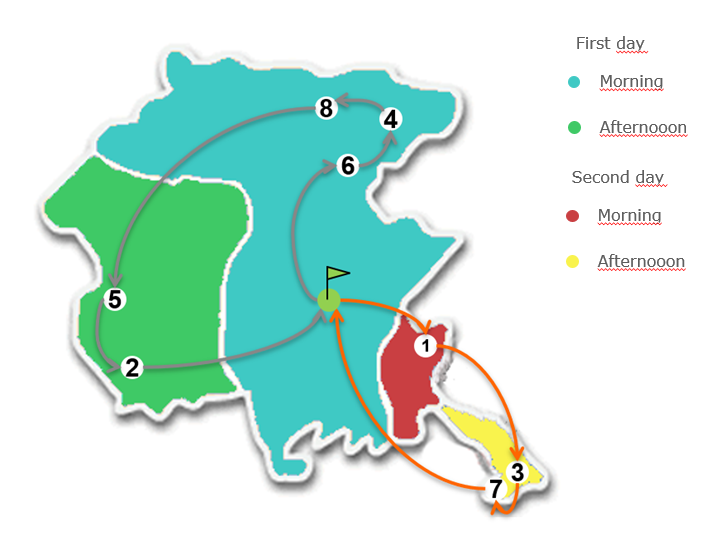
The NextGen Platform uses a Forecasting Model. The system divides the territory into physical zones and pre-calculates the optimal route and availability for each zone in advance. When an external system or a customer requests a service, the system guides them toward pre-optimized time slots for that specific zone. This balances high-density scheduling with localized coverage.
Trade-Off: A highly granular territorial breakdown results in tighter, more efficient routes, but might offer fewer immediate booking options. System configuration should aim for an optimal balance between routing efficiency and appointment frequency.
Key Terminology
|
Term |
Definition |
Operational Note |
|
Booking Module |
The functional module supporting real-time appointment scheduling and negotiation. |
|
|
Task / Work Order Type |
The specific type of operational action requested by the customer. |
Universally mapped to a unique Work Order (WO) Type in the system. |
|
Time Slot |
A bounded time interval on a specific day acting as a "capacity container." |
It defines the maximum number of appointments that can be concurrently scheduled in a specific territory. |
|
Micro-Cluster (mC) |
The smallest geographical unit the territory is divided into (e.g., a city block or zip code area). |
The foundational building block for all scheduling grids. See also Microcluster [FSM Desktop] |
|
Sub-Area / Area |
Hierarchical territorial divisions within an Operations Center (OC). |
Areas consist of sub-areas, which are built from micro-cluster pools. |
|
Booking Service Level (b.s.l.) |
The maximum time limit (in days) allowed to schedule the appointment from the request date. |
Enforces legal or contractual SLAs (e.g., must be fixed within 5 days). |
|
Planning Time Frame (Programming grid timeline) |
The maximum visible window (in days) from "today" that the system will search to offer an appointment. |
Prevents the system from booking too far out into the future. |
|
Appointment |
The system entity that locks a specific date and Time Slot for a Work Order. |
Binds the customer request to the platform's capacity timeline. |
The Standard Booking Workflow
The Booking Module acts as a headless or UI-driven service interacting with external customer portals or CRM systems through a five-step lifecycle:
-
Ingestion: NextGen Platform receives a service request from an external system.
-
Proposal: The platform evaluates territory capacity and returns an optimized, real-time suggestion (FirstDate request).
-
Negotiation: If the first date is rejected, the system provides a matrix of alternative available slots (FurtherDate request).
-
Locking: A temporary slot is reserved while the customer decides.
-
Confirmation / Rebooking: The choice is locked into the schedule, or re-routed if constraints change.
Use Case - Smart Meter Installation
Appointment Statuses & Lifecycle
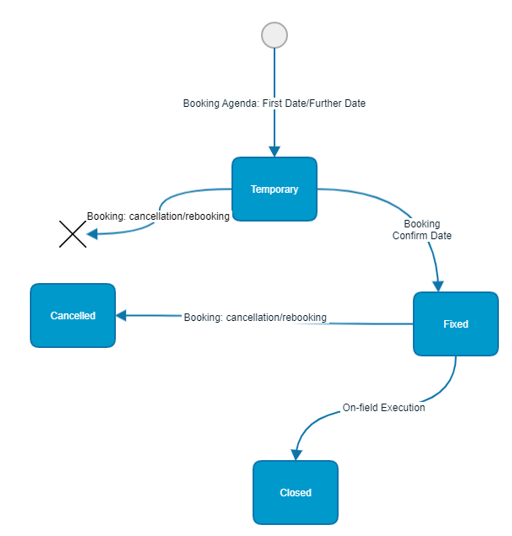
Every appointment inside the Booking Module transitions through a defined sequence of structural data states:
-
TemporaryThe initial status triggered by a date request. The system simultaneously generates a baseline Work Order record and holds the capacity slot. If the session expires without confirmation, this record is physically purged from the database.
-
ScheduledThe status achieved once a confirmation call (
ConfirmDate) is successfully executed. The capacity token is permanently deducted, and the corresponding Work Order is handed over to the active scheduling engine. -
CancelledAssigned when a previously confirmed appointment is annulled. The capacity token is returned to the local Time Slot pool.
-
ClosedThe final status applied automatically once the technician completes or fails the execution of the field activity.