
⚠️ Important: All ESRI licenses and associated costs for using basemaps are the sole responsibility of the customer.
To enable advanced ESRI map features and access customer data on ESRI servers, users must get ESRI licenses and configure ESRI within the FSM Mobile app.
Note: Without a license, users only have access to native maps like Google Maps.
ESRI licensing in FSM Mobile
Get a license
Based on your requirements, users might need one or more of the following licenses to use FSM Mobile:
-
Runtime License: Controls the capabilities of the mobile SDK. This license is provided by customers who don't access private data; otherwise, user authentication is enough. See the mobile worker license.
-
API Key: Used to access public ESRI data (basemaps).
-
Mobile User Authentication: Determines how users access private ArcGIS data.
Note: A runtime license and API key are both needed if you don’t use user authentication.
Validate your license
Users can validate their licenses by either of these options:
-
License string: Only grants access to basemaps and core map features.
-
ESRI user authentication: Grants access to ESRI-related features, basemaps, and private data.
Note: ESRI features are available in the FSM Mobile app through ArcGIS Maps SDK.
ArcGIS runtime license levels
⚠️ Important: Mobile apps require one or more of these ESRI licenses to use ESRI features:
-
SDK license key
-
API Key
-
Mobile worker license
|
License Level |
Capabilities |
Use Case |
Online/Offline Support |
|
Lite (Free) |
|
Basic mapping apps with online data |
Online only |
|
Basic |
|
Offline data viewers |
Online and offline |
|
Standard |
|
Field apps with data collection and editing |
Online and offline |
|
Advanced |
|
High-end GIS analysis applications |
Online and offline |
See License levels and capabilities.
Use a SDK license
For customers that have Enterprise or ArcGIS Online and access private ArcGIS services, you don’t need to generate a separate SDK license to perform user authentication. See Mobile User Authentication.
-
If the customer has ArcGIS Online or Enterprise and doesn't access private ArcGIS services, generate a license string from the ESRI Developer website.
-
If the customer does not have an ArcGIS Online or Enterprise, they can leverage the ESRI Location Platform and generate a free SDK license.
Configure the SDK license key in NextGen FSM
Once the SDK license key is generated, add it to the company configuration:
-
Click Technical settings > System.
-
Under the Configuration tab, add:
foundation.mobile.gis.esriLicenseKey=r = "YOUR_SDK_LICENCE_KEY_GOES_HERE";
Use API keys
An API key is a lightweight authentication method that allows applications to access public ESRI services without requiring user authentication.
Services accessible with API keys
|
Service |
Api Key Requirement |
Description |
|
Basemaps |
Yes |
Access ESRI's worldwide basemap services like:
|
|
Geocoding |
Yes |
Convert addresses into coordinates (forward geocoding) or vice versa (reverse geocoding). |
|
Routing and Directions (service not present in FSM) |
Yes |
Calculate driving/walking routes and directions between points. |
|
Places API (service not present in FSM) |
Yes |
Search for points of interest (POI) like restaurants, landmarks, and businesses. |
API key usage limits and cost
When you access ESRI’s public basemaps there can be different costs:
-
Free Tier: With the Lite (Free) license, public basemaps are free, but there are monthly usage limits.
-
Paid API Key: If you have a higher usage requirement, pay for an API key through ArcGIS Developer or ArcGIS Online subscription.
-
Pay based on your number of requests (such as map tile requests) with the credits in your ArcGIS Online or ArcGIS Developer account.
-
Subscription costs for ArcGIS Online or ArcGIS Enterprise
Both ArcGIS Online and ArcGIS Enterprise have a subscription model:
-
ArcGIS Online Subscription: When you use public basemaps, you use your ArcGIS Online services credits, and you are charged for increased usage.
-
ArcGIS Enterprise Subscription: When you host ArcGIS Enterprise, you have access to ESRI’s public basemaps. Additional credits may also be required if you're exceeding usage limits.
Summary of costs for public basemaps
|
Scenario |
Cost |
|
API Key for Public Basemaps (Free Tier) |
Free (with limited usage) |
|
API Key for Public Basemaps (Paid Tier) |
Based on credit usage for tiles/services |
|
ArcGIS Online Subscription |
Included in subscription (up to the credit limit) |
|
ArcGIS Enterprise Subscription |
Included in subscription (up to the credit limit) |
ESRI enforces request limits to prevent abuse.
Generate an API key
To create an API key:
-
Sign in to your ArcGIS developer account.
-
Click Dashboard > API Keys.
-
From the dropdown menu, select Create API Key.
To generate an API key in ArcGIS Online/Enterprise:
-
Add an API key item in the portal.
-
Embed the API key in the code.
Configure the API key in NextGen FSM
Once the API key is generated, add it to the company configuration:
-
Click Technical Settings > System.
-
Under the Configuration tab, add:
public const string EsriBasemapApiKey = "YOUR_API_KEY_GOES_HERE";
Use a Mobile Worker license
A Mobile Worker license (or a mobile user authentication) is an ArcGIS user license for organizations that rely on field-based data collection and geospatial updates. Since workers can capture real-time data, they have accurate, up-to-date GIS information to make decisions. You can:
-
Collect field data and update GIS data from the field with ESRI's mobile apps.
-
Collect data in areas without internet connection and automatically sync when online.
-
Integrate with field apps (like ArcGIS Field Maps, Survey123, QuickCapture, and Workforce) for seamless data input and task management.
-
Focus on data entry and editing.
-
Note: Users can’t create or analyze maps in ArcGIS Online.
-
Typical users
-
Utility and infrastructure workers who inspect pipelines, power lines, or road networks.
-
Environmental researchers who collect ecological or wildlife data.
-
Construction and engineering teams who monitor site conditions and progress.
-
Public safety and emergency responders who report incidents and hazards.
Notes:
-
This license is primarily used in ArcGIS Online and ArcGIS Enterprise
-
It is associated with the Field Worker user type.
Use a Mobile Worker license in ArcGIS
Use your ArcGIS Identity to show you have permission to access a customer's private ArcGIS Online or ArcGIS Enterprise data. This user authentication gives you:
-
Access to private customer-specific data within their ArcGIS organization.
-
All licensing information and access privileges from your ArcGIS ID.
-
Users securely authenticate through OAuth 2.0 and don’t directly handle or store their credentials.
-
Once users log in, they inherit all features and services related to their organizational role.
-
-
There is seamless integration with federated identity providers.
-
Users only need to log in once to access both FSM Mobile app and secure ESRI services if a customer's Identity Provider (IdP) is already federated with the ESRI IdP.
-
ESRI Apps Available for Mobile Workers
-
ArcGIS Field Maps: Map-based data collection, asset inspections, and navigation.
-
ArcGIS Survey123: Form-based data collection for structured surveys.
-
ArcGIS QuickCapture: Rapid data collection with one-touch logging.
-
ArcGIS Workforce: Task assignment and tracking for field teams.
Use the API key vs. mobile user authentication
|
Scenario |
API Key |
User Authentication (OAuth 2.0) |
|
License SDK |
Yes |
Yes |
|
Public basemap access |
Yes |
Yes |
|
Geocoding/Routing services |
Yes |
Yes (for private datasets) |
|
Offline basemaps (package type TPK/MMPK) |
No |
Yes |
|
Accessing secured customer data |
No |
Yes |
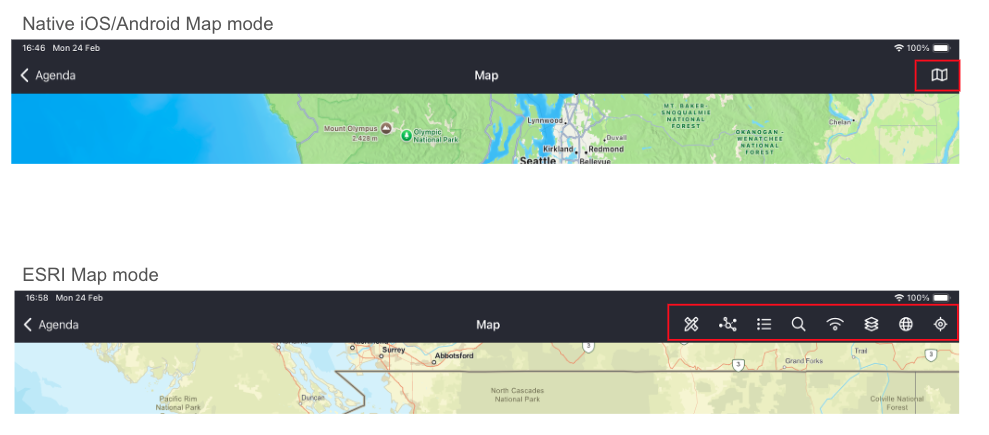
ESRI SDK versus native maps
There are different features available through the ESRI SDK maps versus native maps, like Google Maps and Apple Maps, which don’t require licenses.
Basic Map Features
|
Feature |
ESRI SDK |
Native Map |
|
Basemap selection |
X |
X |
|
Show user location |
X |
|
|
Center user location |
X |
|
|
Show agenda interventions |
X |
X |
|
Compass |
X |
|
|
Map legend |
X |
|
|
Show Feature layer |
X |
|
|
Show Map layer |
X |
|
|
Show WMS layer |
X |
|
|
Show WFS layer |
X |
|
|
Show Web Tiled layer |
X |
|
Advanced Features
|
Feature |
ESRI SDK |
Native Map |
|
Offline packages |
X |
|
|
Search work orders |
X |
|
|
Search technical objects |
X |
|
|
Search warehouses |
X |
|
|
Search address |
X |
|
|
Redlining online/offline |
X |
|
|
Utility network tracing |
X |
|
Native Mobile Maps vs ESRI Maps