
How to call Private API
To understand how communication with the PrivateAPI occurs, it is important to understand how the integrationAPI project is structured.
In Troubleshooting Integration API - Work-Flow there is a diagram showing the workflow of a call coming from an External System: when IntegrationAPI project receives the request from the External System, it acts as an orchestrator and, based on the type of request (therefore based on the use case), makes one or more calls to PrivateAPI layer, which is responsible for performing CRUD operations on db data.
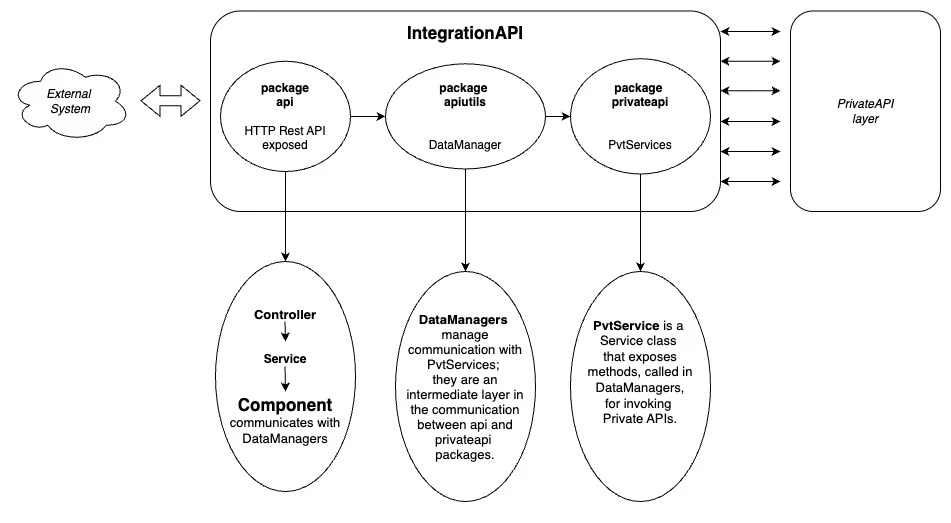
Let's now look in detail at the request's workflow within the IntegrationAPI project:
-
The api package contains all the integration REST APIs, organized by domain and exposed in domain's Rest Controllers. Each domain package is in turn organized into subdomains packages, which contain the Services: Services expose the methods that allow to invoke the Components delegated to execute the logic associated with the specific integration API.
-
The apiutils package is an integration layer which, through the methods exposed in DataManagers, allows communication between the integration APIs and the related private APIs.
-
The privateapi package contains PvtService and DTO classes that allows you to perform CRUD operations on the basic entities through the REST services exposed by the Foundation layer.
DataManager
DataManagers implement small abstractions for POST/PATCH/PUT/DELETE operations to help reduce duplication in Component classes contained in api package.
When creating a custom DataManager, you will use these SDK utility components to handle Private API responses:
-
ResponseChecker - validates responses and throws appropriate exceptions when errors occur
-
ResourceExtractor - extracts data from responses with built-in validation
See the SDK API Reference for Private API Calls for detailed documentation on all available methods.
Warning: The following is an important concept to take into account when customizing DataManager:
Methods exposed in DataManagers follow a strict naming convention, it's purpose it to make as clear as possible several aspects of the method like: what you can expect as a return type (if it is a Field or an Entity, a Collection or an Optional), the return value (i.e., which entity Field represent a Long return type, is it an id or a serial code?), how it behaves ( e.g., if it conditionally throws an Exception), what it requires (e.g., which entity Fields uses as a filter), etc...
Below we use as example the AssetDataManagerImpl class, which implements the AssetDataManager interface, with all the methods currently exposed, from which is possible to take inspiration to write any customization:
@Component
@RequiredArgsConstructor
public class AssetDataManagerImpl implements AssetDataManager {
    //PvtService specific for the management of the Asset domain
    private final PvtAssetService pvtAssetService;
    //check if response has no errors and extracts the body
    private final ResourceExtractor resourceExtractor;
    //check if response has no errors
    private final ResponseChecker responseChecker;
    @Override
    public Collection<Asset> findAllUniqueFieldsById(final Set<String> fields,
                                                     final Set<Long> id) {
        return requireNonNull(findAllUniqueFieldsByIdReactive(fields, id).block());
    }
    @Override
    public Mono<Collection<Asset>> findAllUniqueFieldsByIdReactive(final Set<String> fields,
                                                                   final Set<Long> id) {
        final Mono<GetResponse<Asset>> resp = pvtAssetService.findById(
            GetParams.build(NO_LIMITS, multipleFields(fields)), id);
        return resp.flatMap(assetGetResponse -> {
            final Collection<Asset> assets =
                resourceExtractor.extractAllEnsuringEachElementIsUnique(
                    assetGetResponse,
                    id,
                    Asset::getId,
                    ASSET_NOT_EXISTS,
                    ASSET_NOT_UNIQUE);
            return Mono.just(assets);
        });
    }
    @Override
    public Asset findUniqueFieldsByCodeAndExternalSystemId(final Set<String> fields,
                                                           final String code,
                                                           final Long externalSystemId) {
        return requireNonNull(findUniqueFieldsByCodeAndExternalSystemIdReactive(fields, code,
            externalSystemId).block());
    }
    @Override
    public Mono<Asset> findUniqueFieldsByCodeAndExternalSystemIdReactive(final Set<String> fields,
                                                                         final String code,
                                                                         final Long externalSystemId) {
        final Mono<GetResponse<Asset>> resp = pvtAssetService.findByCodeAndExternalSystemId(
            GetParams.build(LIMIT_TO_TWO, multipleFields(fields)), code,
            externalSystemId);
        return resp.flatMap(assetGetResponse -> {
            final Asset asset = resourceExtractor.extractEnsuringItIsUnique(
                assetGetResponse,
                ASSET_NOT_EXISTS,
                singletonList(code),
                ASSET_NOT_UNIQUE,
                singletonList(code));
            return Mono.just(asset);
        });
    }
    @Override
    public Long findUniqueIdByCode(final String code) {
       return requireNonNull(findUniqueIdByCodeReactive(code).block());
    }
    @Override
    public Mono<Long> findUniqueIdByCodeReactive(final String code) {
        final Mono<GetResponse<Asset>> resp = pvtAssetService.findByCode(
            GetParams.build(LIMIT_TO_TWO, singleField("id")), code);
        return resp.flatMap(assetGetResponse -> {
            final Asset asset = resourceExtractor.extractEnsuringItIsUnique(
                assetGetResponse,
                ASSET_NOT_EXISTS,
                singletonList(code),
                ASSET_NOT_UNIQUE,
                singletonList(code));
            return Mono.just(asset.getId());
        });
    }
    @Override
    public Optional<Asset> findUniqueIfExistsByCode(final String code) {
        return requireNonNull(findUniqueIfExistsByCodeReactive(code).block());
    }
    @Override
    public Mono<Optional<Asset>> findUniqueIfExistsByCodeReactive(final String code) {
        final Mono<GetResponse<Asset>> resp =
            pvtAssetService.findByCode(GetParams.build(LIMIT_TO_TWO), code);
        return resp.flatMap(assetGetResponse -> {
            final Optional<Asset> assetOpt = resourceExtractor.extractIfExistsEnsuringItIsUnique(
                assetGetResponse,
                ASSET_NOT_UNIQUE,
                singletonList(code));
            return Mono.just(assetOpt);
        });
    }
    @Override
    public Optional<String> findUniqueCodeIfExistsById(final Long id) {
        return requireNonNull(findUniqueCodeIfExistsByIdReactive(id).block());
    }
    @Override
    public Mono<Optional<String>> findUniqueCodeIfExistsByIdReactive(final Long id) {
        final Mono<GetSingleResponse<Asset>> resp = pvtAssetService.findById(
            GetSingleParams.build(singleField("code")), id);
        return resp.flatMap(assetGetSingleResponse -> {
            final Optional<Asset> mayBeAsset =
                resourceExtractor.extractIfExists(assetGetSingleResponse);
            return Mono.just(mayBeAsset.map(Asset::getCode));
        });
    }
    @Override
    public Optional<Long> findFirstIdByCode(final String code) {
        return requireNonNull(findFirstIdByCodeReactive(code).block());
    }
    @Override
    public Mono<Optional<Long>> findFirstIdByCodeReactive(final String code) {
        final Mono<GetResponse<Asset>> resp =
            pvtAssetService.findByCode(GetParams.build(LIMIT_TO_ONE, singleField("id")), code);
        return resp.flatMap(assetGetResponse -> {
            final Optional<Asset> mayBeAsset =
                resourceExtractor.extractFirstIfExists(assetGetResponse);
            return Mono.just(mayBeAsset.map(Asset::getId));
        });
    }
    @Override
    public Long create(final Asset asset) {
        return requireNonNull(createReactive(asset).block());
    }
    @Override
    public Mono<Long> createReactive(final Asset asset) {
        final Mono<PostResponse<IdResponse>> resp = pvtAssetService.createAsset(asset);
        return resp.flatMap(idResponsePostResponse ->
            Mono.just(resourceExtractor.extractEnsuringExists(idResponsePostResponse,
                IdResponse::getId))
        );
    }
    @Override
    public void addAssetToParent(final Long parentAssetId,
                                 final Long childAssetId) {
        addAssetToParentReactive(parentAssetId, childAssetId).block();
    }
    @Override
    public Mono<Void> addAssetToParentReactive(final Long parentAssetId,
                                               final Long childAssetId) {
        return pvtAssetService.addAssetToParent(parentAssetId, childAssetId)
            .flatMap(responseChecker::throwIfResponseHasErrorReactive);
    }
    @Override
    public void removeAssetFromParent(final Long currentParentAssetId,
                                      final Long assetId) {
        removeAssetFromParentReactive(currentParentAssetId, assetId).block();
    }
    @Override
    public Mono<Void> removeAssetFromParentReactive(final Long currentParentAssetId,
                                                    final Long assetId) {
        return pvtAssetService.removeAssetFromParent(currentParentAssetId, assetId)
            .flatMap(responseChecker::throwIfResponseHasErrorReactive);
    }
    @Override
    public void updateLinearAssetLocation(final Long assetId,
                                          final LinearAssetLocationPatch linearAssetLocationPatch) {
        updateLinearAssetLocationReactive(assetId, linearAssetLocationPatch).block();
    }
    public Mono<Void> updateLinearAssetLocationReactive(final Long assetId,
                                                        final LinearAssetLocationPatch linearAssetLocationPatch) {
        return pvtAssetService.patchLinearAssetLocation(assetId, linearAssetLocationPatch)
            .flatMap(responseChecker::throwIfResponseHasErrorReactive);
    }
    @Override
    public void update(final Long assetId,
                       final AssetPatch assetPatch) {
        updateReactive(assetId, assetPatch).block();
    }
    @Override
    public Mono<Void> updateReactive(final Long assetId,
                                     final AssetPatch assetPatch) {
        return pvtAssetService.patchAsset(assetId, assetPatch)
            .flatMap(responseChecker::throwIfResponseHasErrorReactive);
    }
}
Data Managers' customization
Do you need to call an existing pvtUrl, implemented also in IntegrationAPI's pvtService, but not available in methods exposed in the existing Data Managers?
In this case, rather than making a custom implementation, contact Integration API's developers team to ensure that the requested implementation is made available (this type of 'customization' can be useful for your project, but also for others).
Do you need to change call filters of an existing Data Manager's method?
-
Search for the specific domain's DataManager
-
Customize it (creating a new customDataManager interface and its implementation customDataManagerImpl) by adding the new method with the custom filters
-
PrivateApiService
PrivateApiService is a service class that exposes methods, called in DataManagers, to invoke private APIs: it is therefore the point, within the request flow, that actually communicates with the PrivateAPI layer.
When creating a custom PvtService, you will use PrivateApiHttpClient to execute HTTP requests to Private API endpoints. See the SDK API Reference for Private API Calls for detailed documentation on all available methods.
Below we use as example the PvtAssetServiceImpl class, which implements the PvtAssetService interface, with all the methods currently exposed, from which is possible to take inspiration to write any customization:
@Service
@RequiredArgsConstructor
public class PvtAssetServiceImpl implements PvtAssetService {
    private final PrivateApiHttpClient privateApiHttpClient;
    private static final String ASSETS_BY_ASSET_ID = "/assets/r1/assets/{assetId}";
    @Override
    public Mono<GetSingleResponse<Asset>> findById(final GetSingleParams getSingleParams,
                                                   final Long id) {
        return privateApiHttpClient.getReactive(
            ASSETS_BY_ASSET_ID,
            new Object[] {id},
            Asset.class,
            getSingleParams);
    }
    @Override
    public Mono<GetResponse<Asset>> find(final GetParams getParams,
                                         final GetFilters getFilters) {
        return privateApiHttpClient.getReactive(
            "/assets/r1/assets",
            new Object[] {},
            Asset.class,
            getParams,
            getFilters);
    }
    @Override
    public Mono<GetResponse<Asset>> findById(final GetParams getParams,
                                             final Collection<Long> id) {
        return find(getParams, singleFilter("id", id));
    }
    @Override
    public Mono<GetResponse<Asset>> findByCode(final GetParams getParams,
                                               final String code) {
        return find(getParams, singleFilter("code", code));
    }
    @Override
    public Mono<GetResponse<Asset>> findByCodeAndExternalSystemId(final GetParams getParams,
                                                                  final String code,
                                                                  final Long externalSystemId) {
        return find(getParams,
            doubleFilter("code", code, "externalSystemId", externalSystemId));
    }
    @Override
    public Mono<PostResponse<IdResponse>> createAsset(final Asset asset) {
        return privateApiHttpClient.postReactive(
            "/assets/r1/assets",
            new Object[] {},
            IdResponse.class,
            Asset.class,
            asset);
    }
    @Override
    public Mono<PatchResponse> patchAsset(final Long assetId,
                                          final AssetPatch assetPatch) {
        return privateApiHttpClient.patchReactive(
            ASSETS_BY_ASSET_ID,
            new Object[] {assetId},
            AssetPatch.class,
            assetPatch);
    }
    @Override
    public Mono<PostResponse<Void>> addAssetToParent(final Long parentAssetId,
                                                     final Long childAssetId) {
        final ChildAsset childAsset = ChildAsset.builder().assetChildId(childAssetId).build();
        return privateApiHttpClient.postReactive(
            "/assets/r1/assets/{assetId}/children",
            new Object[] {parentAssetId},
            Void.class,
            ChildAsset.class,
            childAsset);
    }
    @Override
    public Mono<DeleteResponse> removeAssetFromParent(final Long parentAssetId,
                                                      final Long childAssetId) {
        return privateApiHttpClient.deleteReactive(
            "/assets/r1/assets/{assetId}/children/{assetChildId}",
            new Object[] {parentAssetId, childAssetId});
    }
    @Override
    public Mono<PatchResponse> patchLinearAssetLocation(final Long assetId,
                                                        final LinearAssetLocationPatch linearAssetLocationPatch) {
        return privateApiHttpClient.patchReactive(
            "/assets/r1/assets/{assetId}/linear-asset-locations",
            new Object[] {assetId},
            LinearAssetLocationPatch.class,
            linearAssetLocationPatch);
    }
}
PrivateApiServices' customization
Do you need to call an existing pvtUrl implemented on Private API side but not in Integration API?
-
Search for the specific domain's PvtService
-
Customize it (creating a new customPvtService interface and its implementation customPvtServiceImpl) by adding the new call to pvtUrl you need
-
-
Search for the specific domain's DataManager
-
Customize it (creating a new customDataManager interface and its implementation customDataManagerImpl) by injecting the customPvtService and call the new pvtUrl added
-
Create a new custom Private API
-
Create new domain's CustomPvtService interface
-
Create a new CustomPvtServiceImpl with the new custom pvtUrl
-
-
Create new domain's CustomDataManager interface
-
Create a new CustomDataManagerImpl
-
Inject the new PvtService
-
Create a new method that is responsible for calling the new pvtUrl created, using the method exposed in new PvtService interface
-
-
Warning: If you need to create a new custom pvtUrl that is not present in the product, therefore it is not present on FSM, the entire structure must be created from scratch:
create new CustomDataManager
create new CustomDataManagerImpl which implements CustomDataManager
if needed, create the exceptions you want to handle with the pvtService call's response (see Development tips - Exceptions)
create new CustomPvtService
create new CustomPvtServiceImpl which implements CustomPvtService
Remember the flow:
CustomDataManager is used to convey the request towards the customPvtService: you must inject the customPvtService inside the customDataManager to invoke the method (which will have to be created ad hoc) that will allow you to invoke the new pvtUrl.
CustomPvtService exposes the method, invoked by the CustomDataManager, that allows to actually communicate with the new custom pvt url created in PrivateAPI layer.