Use natural language commands to search for schedulable activities in the Daily Plan view
Status: Beta (Demo Only) This feature is currently available as a Technical Preview for demonstration purposes only. It is designed to illustrate future capabilities during client presentations and is not supported for production use.
-
Scope: Presentations and guided demos.
-
Limitations: Not available for direct client installation or daily operations.
Before you use this feature:
-
Contact your system administrator to ensure the configuration is in place and that they activate the ai.assistant module.
-
Enable your user type.
Note: The feature is available only with SSO Authentication
Activate user type
-
Navigate to Configuration > Core > User > User types.
-
Select the User type you wish to configure.
-
Turn on Enabling the Dispatcher Power Search view on Daily Plan Schedulable Activities panel.
-
To apply the changes, click Save.
Use Dispatcher Power Search
-
In the NextGen FSM, navigate to Features > Core > Daily and multi-day plan > Daily plan.
-
Click the Schedulable Activities panel.
-
Click the Dispatcher Power Search button.
-
An input text field will appear.
-
-
Type your search criteria in plain language.
-
Example:
"Show all repair activities expiring today"
-
-
Click Enter. The system processes the request and automatically updates the Schedulable Activities list to show only the items that match your criteria.
Use the supported search scope
Optimize query data, entities, and attributes like::
-
Work Orders
-
Technical Object & Location: Operation Center, Addresses, Assets, Accounts, Asset Types and Account Types
-
Typology & Status: Request Type, Service Type, Activity and Operation Status
|
Entity |
Field |
Description |
|
Operation Center |
Id |
Unique identifier of the operations center |
|
Description |
Description/name of the operation center |
|
|
Work Order |
Id |
Unique identifier of the WO |
|
Code |
Internal code of the WO used for identification and reference within the system |
|
|
External Code |
External reference code of the WO, provided by external systems or customers |
|
|
Urgency Id |
Unique identifier of the WO urgency level (priority and time sensitivity), which affects scheduling and resource allocation |
|
|
Urgency Description |
Description of the work order urgency level |
|
|
Work Order Creation Date |
Date range when the WO was created |
|
|
Work Order Appointment Date
|
Date range of the WO appointment, which is the scheduled release date or target date for completing the WO |
|
|
Work Order Start Date
|
Date when the work order execution started |
|
|
Work Order End Date
|
Date when the work order execution ended |
|
|
Request Type |
Id |
One or more request type identifiers |
|
Description |
One or more request type descriptions |
|
|
Service Type |
Id |
One or more service type identifiers, which categorize WOs by the type of service being provided |
|
Description |
One or more service type descriptions that are part of the WO type |
|
|
Technical Object Type |
Asset Type Id |
One or more asset type identifiers which classify physical equipment, infrastructure, or installations that require field service |
|
Asset Type Description |
One or more asset type descriptions |
|
|
Account Type Id |
One or more account type identifiers that classify customer accounts or business entities that own or are responsible for technical objects |
|
|
Account Type Description
|
One or more account type descriptions |
|
|
Technical Object |
Asset Id |
Unique identifier of the asset which is physical equipment, infrastructure, or an installation on which field service operations are performed |
|
Asset Code |
Code of the asset used for identification and reference |
|
|
Asset Description |
Description and name of the asset |
|
|
Account Id |
Unique identifier of the account which represents customers or business entities that own or are responsible for assets and receive field services |
|
|
Account Code |
Code of the account used for identification and reference |
|
|
Address |
Id |
Unique identifier of the address where the work order operation will be performed |
|
Normalized Municipality |
Normalized municipality/city name of the address |
|
|
Normalized Postal Code |
Normalized postal code of the address |
|
|
Normalized Street |
Normalized street name of the address |
|
|
Work Order Operation Status |
Id |
Unique identifier of the WO operation status which represents the current state of the operation in its lifecycle. |
|
Description |
Description of the WO operation status |
|
|
Activity |
Id |
One or more activity identifiers which define the specific type of work or intervention to be performed during a WO operation. |
|
Description |
One or more activity descriptions |
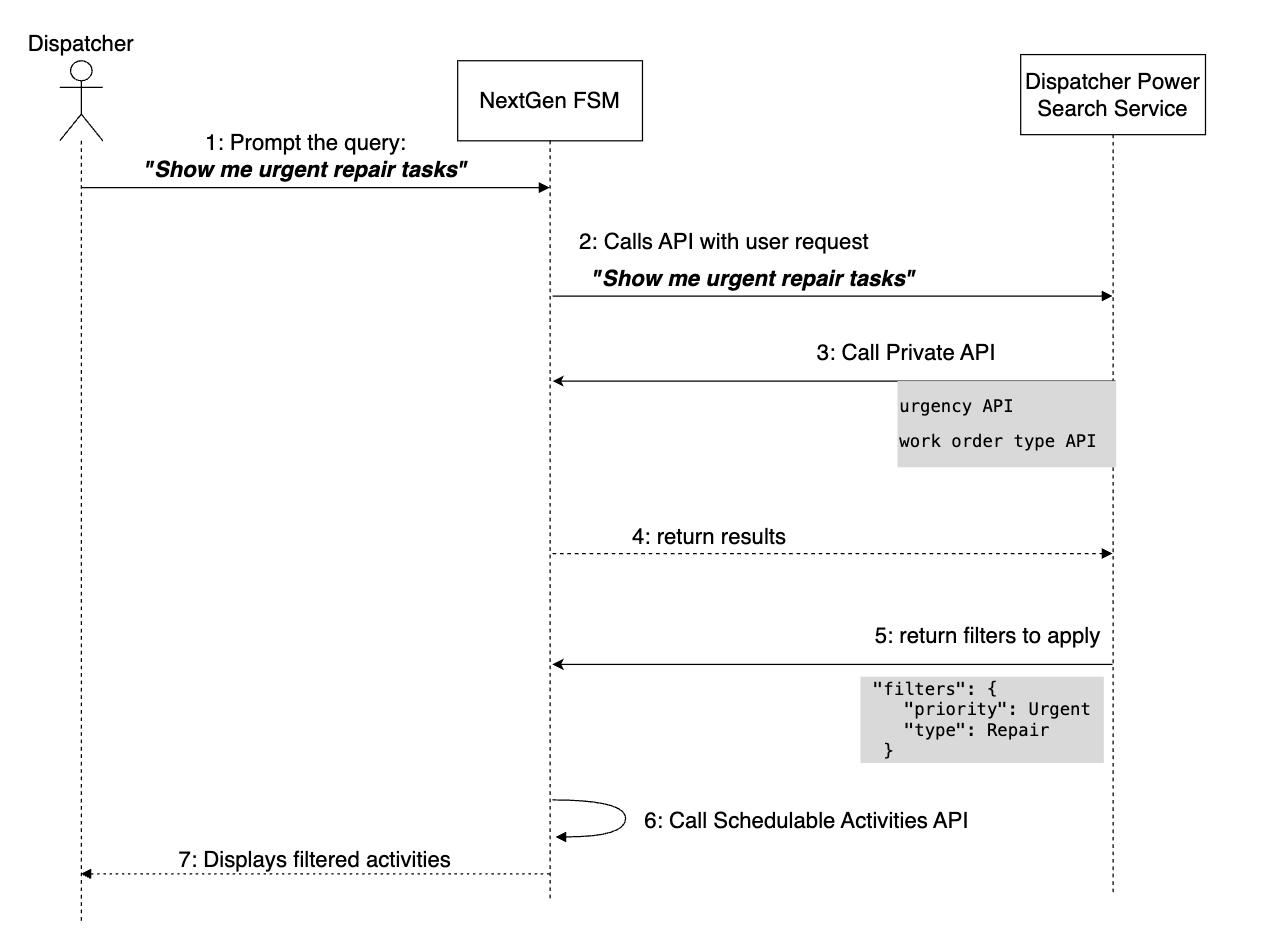
Dispatcher power search flow
-
User Input: The dispatcher enters a natural language query into the search panel.
-
For example, the dispatcher enters, "Show me urgent repair tasks".
-
-
Request Transmission: NextGen FSM forwards the raw text query to the Dispatcher Power Search service.
-
Intent Analysis: The search service interprets the user's intent to identify the relevant business entities and attributes.
-
For example, the service identifies key words of “urgency” and “work order type”.
-
-
Context Resolution: The service triggers internal (private) APIs via NextGen FSM to retrieve necessary metadata and resolve specific definitions.
-
For example, the service maps "urgent" to a specific priority ID.
-
-
Filter Generation: Based on the analyzed data, the Search Service constructs a precise set of filters compatible with the Schedulable Activities API.
-
Execution & Display: NextGen FSM applies these filters to the Schedulable Activities API and updates the UI to display the filtered list of activities to the dispatcher.
See the image below for a full workflow example: