
|
Http Verb |
GET |
|---|---|
|
Url |
/integration/workforce/r1/resources |
|
Permissions required |
Resource Configuration: View (fsm.core.resource.configuration.view)) |
|
Last Modified Version |
r1 |
|
Tech Tags |
MULTILANGUAGE-FIELDS |
|
Available Async |
No |
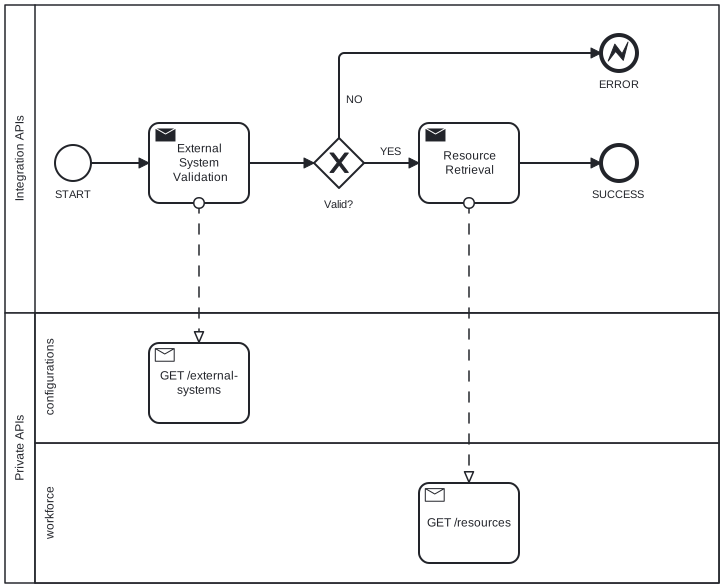
BPMN Diagram (TBD)
Business Logic
This Integration API returns the Resources.
System verifies Permission Required and starts the elaboration that is organized in steps.
STEP 1 - External System Validation
System takes Input fields and checks their existence in internal configuration.
API Verb: GET
Resource: External Systems
Input: externalSystemCode, active=true
Output: externalSystemId
If System can obtain the Output fields → continue to next step.
If System can’t obtain the Output fields → responds with error. Elaboration is stopped.
STEP 2 - Resource Existence
System takes Input fields and checks their existence.
API Verb: GET
Resource: Resource
Input: {startDate} and/or {endDate} and/or {email} and/or {identificationNumber} and/or {secondaryIdentificationNumber} and/or {loan} , _page
Output: startDate, endDate, email, identificationNumber, secondaryIdentificationNumber, loan, resourceTypeId, operationCenterId, workCenterId
If System can obtain the Output fields → continue to next step.
If System can’t obtain the Output fields → elaboration is stopped. See Response payload fields
Error Type:
-
Others - see link in Resource
STEP 3 - User type Transcode
System takes Input fields and checks their existence.
If System can obtain the Output fields → continue to next step.
If System can’t obtain the Output fields → responds with error. Elaboration is stopped
Error Type:
-
Others - see link in Resource
STEP 4 - Operation Center Transcode
System takes Input fields and gets the resource.
If System can obtain the Output fields → continue to next step.
If System can’t obtain the Output fields → responds with error. Elaboration is stopped
Error Type:
-
Others - see link in Resource
STEP 5 - Work Center Transcode
System takes Input fields and gets the resource.
If System can obtain the Output fields → Elaboration is stopped.
If System can’t obtain the Output fields → responds with error. Elaboration is stopped
Error Type:
-
Others - see link in Resource
Path Parameters
As their name suggests, they are included in the URL path of the endpoint.
Not applicable.
Query String Parameters
Start with a ? and includes parameters listed one after the another separated by &.
Filter
|
Field |
Description |
Mandatory |
Constraint |
|
|---|---|---|---|---|
|
1 |
_page |
Object for pagination |
N |
Null or Not Blank |
|
2 |
externalSystemCode |
External System Code |
Y |
|
|
3 |
startDate |
Interval of date (from-to) of resource start date for filtering |
N |
|
|
4 |
endDate |
Interval of date (from-to) of resource end date for filtering |
N |
|
|
5 |
|
|
N |
Null or Not Blank |
|
6 |
identificationNumber |
Identification Number |
N |
Null or Not Blank |
|
7 |
secondaryIdentificationNumber |
Secondary Identification Number |
N |
Null or Not Blank |
|
8 |
loan |
Resource in loan |
N |
|
Fields
The parameter _fields allows to choose output fields. More info here How to use APIs: Output fields selection.
Header Parameters
Parameters included in the request headers. Generally, request headers are used to keep authorization parameters.
Default.
Request example
{baseUrl}/integration/workforce/r1/resources?externalSystemCode=SAP&identificationNumber=MI0030
Response documentation
Response payload fields
|
Field |
Field Type |
Description |
|
|---|---|---|---|
|
1 |
startDate |
|
Resource Start Date |
|
2 |
endDate |
|
Resource End Date |
|
3 |
|
|
|
|
4 |
identificationNumber |
|
Identification Number |
|
5 |
secondaryIdentificationNumber |
|
Secondary Identification Number |
|
6 |
loan |
|
Resource in loan |
|
7 |
type |
User Type |
|
|
8 |
operationCenter |
Operation Center |
|
|
9 |
workCenter |
Work Center |
typeObject
|
Field |
Description |
|
|---|---|---|
|
1 |
code |
User Type Code |
|
2 |
description |
User Type Description |
operationCenterObject
|
Field |
Description |
|
|---|---|---|
|
1 |
code |
Code |
|
2 |
description |
Description |
workCenterObject
|
Field |
Description |
|
|---|---|---|
|
1 |
code |
Code |
|
2 |
description |
Description |
Compliant with RFC Standard https://www.rfc-editor.org/rfc/rfc9457.html
Extension fields:
|
Field |
Description |
Note |
|---|---|---|
|
code |
Extension member of a Problem Details Object that contains the error code |
Only for ERROR |
Response example
{
  "content": [
    {
      "extension": {
        "myFieldName": "myValue"
      },
      "email": "rossi.marco@gmail.com",
      "identificationNumber": "N1234567",
      "secondaryIdentificationNumber": "N00000927",
      "startDate": "2026-03-19T18:54:34.458Z",
      "endDate": "2026-03-19T18:54:34.458Z",
      "loan": true
    }
  ],
  "page": {
    "num": 0,
    "hasMore": true
  }
}
Error example
{
  "type": "about:blank",
  "title": "Not Found",
  "status": 404,
  "detail": "External system string does not exist",
  "instance": "/integration/workforce/r1/resource-skills",
  "code": "IA001_001"
}